 PH
PH
hitpaw-video-converter
Download HitPaw Video Converter 4.5.2
HitPaw Video Converter is a video converter that converts videos at the fastest speed. It can convert videos and audios to 800+ formats for different devices, with a one-click downloader for videos and music from 1000+ popular websites. Edit and customize your videos by trimming, merging, and more. Accelerate video conversion speed up to 120 times without losing quality. With more functions such as AI-powered voice removal, convert Apple Music and Spotify Music to MP3, AAC, etc., batch convert images, create GIFs, compress files, and a variety of built-in video/image editing features, and much more.
HitPaw Video Converter is a program designed to allow users to convert video files to the formats they need quickly and easily. It supports many popular video file formats such as MP4, AVI, MOV, MKV, WMV, and more. It also supports other audio file formats such as MP3, WAV, AAC, etc.
HitPaw Video Converter is very easy to use, making it suitable for all users, regardless of their video conversion expertise. All you have to do is select the video file you want to convert and then choose the desired format for the output file. If you want, you can adjust settings such as video resolution, frame rate, audio, etc.
Especially when you need to convert video files to a specific device, such as mobile phones, tablets, media players with different operating systems or even DVD players that support specific files, you can do so using HitPaw Video Converter, which supports easily converting video files to a format compatible with your desired device.
In addition to converting video files, HitPaw Video Converter also provides other interesting features such as video editing, video quality adjustment, adding security signals to videos, and many more. It also has additional parameter settings that give you precise control over video file conversion.
HitPaw Video Converter is a powerful and easy-to-use program that helps you convert video files quickly and efficiently. Whether you need to convert a video file to a specific format or enhance the quality of a video, HitPaw Video Converter is an option you should consider.
Features:
- Easy to use
- Convert video, audio, and DVD files to 1000+ formats with 120x faster speed
- Convert Apple Music and Spotify Music to MP3, AAC, etc.
- 100% AI Remove vocals from music and get the instrumental track
- Download videos from 10000+ video sharing websites and download Insta profile HD
- Batch convert images, create GIFs, compress files and rich video/image editing features
- 1000+ formats are supported
- Save Time with Batch Processing
- Up to 120X real-time faster conversion
- Excellent Video Downloader from YouTube, TikTok, Facebook and 10000+ Websites
- Convert YouTube to MP3, MP4 and save video/audio from 10,000 other sites like Tik Tok, Facebook, Instagram, Vimeo, etc.
- Download Playlist
- Up to 8K Resolution
- Download Subtitle
- Losslessly Download and Convert Spotify to MP3/M4A/WAV
- Ideal for Music Lovers to Remove Vocals from Songs
- Built-in Rich Editing Features Make Your Videos and Images Stand Out
- Built-in Easy but Advanced Video Tools
- And more.
Screenshot
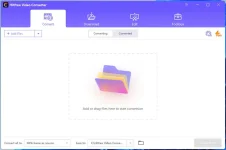
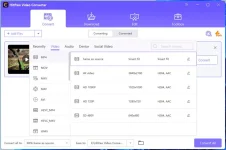
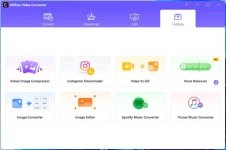
System Requirements
Windows 7 / 8 / 8.1 / 10 / 11 (64-bit – all editions)
CPU : 750MHz Intel or AMD (CPU)
RAM : 256MB or above
HDD : 100MB or above free space
Display : 1024 x 768 pixels or Higher
Official Website : You do not have permission to view the full content of this post. Log in or register now.
Software Version : 4.5.2
File Size : 403 MB
You do not have permission to view the full content of this post. Log in or register now.
System Requirements
Windows 7 / 8 / 8.1 / 10 / 11 (64-bit – all editions)
CPU : 750MHz Intel or AMD (CPU)
RAM : 256MB or above
HDD : 100MB or above free space
Display : 1024 x 768 pixels or Higher
Official Website : You do not have permission to view the full content of this post. Log in or register now.
Software Version : 4.5.2
File Size : 403 MB
You do not have permission to view the full content of this post. Log in or register now.