 PH
PHiamrhogel24
Leecher
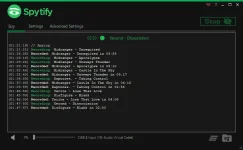
Spytify is a Spotify recorder for Windows which records Spotify audio without recording or playing ads. It automatically splits songs into separate tracks and records to WAV or MP3 with media metadata, meaning you can easily start enjoying your music offline.
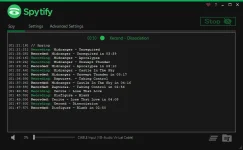
However, Spytify ensures that all tracks will be the official released one, all sound volume normalized and with media tags and album cover. Playlist Downloaders get mostly all tracks from YouTube which means that they can’t guarantee the choosen track will fit 100% the one in your playlist and they will all be the same quality.
Spytify encodes to the same quality that Spotify outputs (You do not have permission to view the full content of this post. Log in or register now.), so the recorded copy will be indistinguishable from Spotify’s one.
Spytify is meant to be used with a Spotify free account, even better a fresh new one.
Listen to an mp3 sample at 120kbps:
A recorder requires a good sound card to be able to record good quality, that’s why Spytify comes with a Virtual Audio Cable device, if you have issues with your sound card (volume slider and other apps sound affects the recordings, or overall recorded sound quality is worst than Spotify) you can install this virtual device using the Speakers+ icon in Spytify settings.
Don’t forget to hit the You do not have permission to view the full content of this post. Log in or register now. for tips on:
You do not have permission to view the full content of this post. Log in or register now.
You do not have permission to view the full content of this post. Log in or register now.
Spytify records what Spotify outputs, which is a longer process than downloading a Spotify playlist with a tool.However, Spytify ensures that all tracks will be the official released one, all sound volume normalized and with media tags and album cover. Playlist Downloaders get mostly all tracks from YouTube which means that they can’t guarantee the choosen track will fit 100% the one in your playlist and they will all be the same quality.
Spytify encodes to the same quality that Spotify outputs (You do not have permission to view the full content of this post. Log in or register now.), so the recorded copy will be indistinguishable from Spotify’s one.
Spytify is meant to be used with a Spotify free account, even better a fresh new one.
Listen to an mp3 sample at 120kbps:
You do not have permission to view the full content of this post. Log in or register now.
Follow the steps shown in the F.A.Q section : You do not have permission to view the full content of this post. Log in or register now.You do not have permission to view the full content of this post. Log in or register now.
A standard use is to install the Virtual Audio Cable and start a recording session on it using your favorite playlist and let it record overnight, so you avoid waiting for it to end, because Spytify does not download but records. You will then get all your songs automatically split into separate tracks without ads and with metadata.A recorder requires a good sound card to be able to record good quality, that’s why Spytify comes with a Virtual Audio Cable device, if you have issues with your sound card (volume slider and other apps sound affects the recordings, or overall recorded sound quality is worst than Spotify) you can install this virtual device using the Speakers+ icon in Spytify settings.
Don’t forget to hit the You do not have permission to view the full content of this post. Log in or register now. for tips on:
- You do not have permission to view the full content of this post. Log in or register now.
- You do not have permission to view the full content of this post. Log in or register now.
- You do not have permission to view the full content of this post. Log in or register now.
- You do not have permission to view the full content of this post. Log in or register now.
You do not have permission to view the full content of this post. Log in or register now.
Spytify runs on Windows only.- Microsoft Framework (You do not have permission to view the full content of this post. Log in or register now. or higher).
- Spotify Desktop application.
You do not have permission to view the full content of this post. Log in or register now.