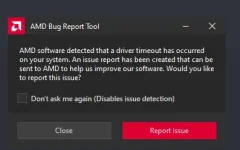
Hello! I'm sorry to hear about the issue you're experiencing with your PC. It seems like you're encountering a problem with your Sapphire Pulse RX 570 4GB Nitro graphics card. The error message you provided indicates that there might be a problem with the GPU drivers or the hardware itself.
Since you've already tried updating the drivers and using DDU (Display Driver Uninstaller) to clean install the drivers, here are some additional steps you can take to troubleshoot and potentially resolve the issue:
1. Check for Overheating: Make sure that your GPU is not overheating. Use software like MSI Afterburner or GPU-Z to monitor the temperature of your graphics card while running a game. Overheating can cause stability issues.
2. Power Supply: Ensure that your power supply unit (PSU) is providing enough power to your GPU. Insufficient power can lead to stability problems.
3. Check for Hardware Issues: Test your GPU in another system if possible to see if the issue persists. This will help determine if the problem is with the GPU itself.
4. BIOS Update: Check if there are any BIOS updates available for your motherboard. Sometimes, updating the BIOS can resolve compatibility issues with certain hardware components.
5. Windows Update: Ensure that your operating system is up to date with the latest Windows updates. Sometimes, system updates can address compatibility issues.
6. Contact Manufacturer Support: If the issue persists after trying the above steps, consider reaching out to Sapphire's customer support for further assistance. They may be able to provide specific troubleshooting steps or advise on potential warranty options.
I hope these suggestions help you in resolving the issue you're facing with your GPU. Let me know if you need further assistance or if you have any other questions. Good luck!
 PH
PH