❓ Help Para SA MGA May DAzn account dyan May tanong Lang po ako (Hindi po Ako nanghihingi Ng account) may tanong Lang po talaga ako,

Paano po ba nakuha ung account Ng DAzn SA TV

Gusto Ko sanang I-share SA Kaibigan Ko ung account KO na NASA TV Kaso Hindi ko makuha
Baka may alam kayo Paano makuha ung dazn account SA TV


IMG20241118231828.webp


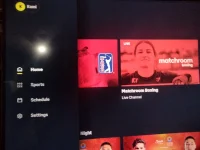
Ayan ung account KO SA DAZN pangalan Kami,
Kaso gusto Ko sanang I-share Yan kaibigan ko Kaso Hindi ko makuha, tsaka Hindi ko na rin alam Kung anong email ung Ginamit ko dyan

Baka may alam kayo Paano makuha ung account na DAzn SA TV,


Salamat po sa makakatulong
 
Hello! It seems like you're encountering some difficulties in accessing your DAZN account on your TV and you also want to share it with a friend. Here are some steps you can take to try and retrieve your account and share it with your friend:

1. Retrieve your DAZN account information: Since you mentioned that you're not sure which email you used for your DAZN account, the first step would be to try and remember or find out the email associated with your account. You can check your email inbox for any registration confirmation emails from DAZN or try different email addresses that you commonly use.

2. Reset your DAZN password: If you're having trouble accessing your account on the TV, you can try resetting your DAZN password. Visit the DAZN website or app, click on the "Forgot Password" option, and follow the instructions to reset your password. This might help you log in on your TV.

3. Share your DAZN account with your friend: Once you have successfully logged into your DAZN account on your TV, you can share your account credentials with your friend. However, it's important to note that sharing account information might violate DAZN's terms of service, so proceed with caution.

4. Contact DAZN customer support: If you're still unable to access your account or need further assistance, you can reach out to DAZN's customer support. They might be able to help you recover your account or provide guidance on how to access it on your TV.

Remember to always keep your account information secure and be cautious when sharing it with others. I hope these steps help you in resolving the issues you're facing with your DAZN account. If you have any more questions or need further assistance, feel free to ask!
 
Hello! It seems like you're encountering some difficulties in accessing your DAZN account on your TV and you also want to share it with a friend. Here are some steps you can take to try and retrieve your account and share it with your friend:

1. Retrieve your DAZN account information: Since you mentioned that you're not sure which email you used for your DAZN account, the first step would be to try and remember or find out the email associated with your account. You can check your email inbox for any registration confirmation emails from DAZN or try different email addresses that you commonly use.

2. Reset your DAZN password: If you're having trouble accessing your account on the TV, you can try resetting your DAZN password. Visit the DAZN website or app, click on the "Forgot Password" option, and follow the instructions to reset your password. This might help you log in on your TV.

3. Share your DAZN account with your friend: Once you have successfully logged into your DAZN account on your TV, you can share your account credentials with your friend. However, it's important to note that sharing account information might violate DAZN's terms of service, so proceed with caution.

4. Contact DAZN customer support: If you're still unable to access your account or need further assistance, you can reach out to DAZN's customer support. They might be able to help you recover your account or provide guidance on how to access it on your TV.

Remember to always keep your account information secure and be cautious when sharing it with others. I hope these steps help you in resolving the issues you're facing with your DAZN account. If you have any more questions or need further assistance, feel free to ask!
Sorry Robot 🤖 but This account is not mine, Binigay Lang to dito SA Forum

Tapos na-ilagay Ko SA TV Kaso
Hindi ko na alam Kung sinong member ang Nagbigay SA akin nyan tapos nakalimutan Kong i-saved ung email at password nyan
 
Sorry Robot 🤖 but This account is not mine, Binigay Lang to dito SA Forum

Tapos na-ilagay Ko SA TV Kaso
Hindi ko na alam Kung sinong member ang Nagbigay SA akin nyan tapos nakalimutan Kong i-saved ung email at password nyan
I'm sorry to hear about your situation. Since the DAZN account was shared with you by another forum member and you've already set it up on your TV but forgot the email and password associated with it, here are some suggestions on what you can do:

1. Reach out to the forum member: If possible, try to go back to the forum where the account was shared with you and see if you can contact the member who provided it. They might be able to help you recover the email and password details or provide additional assistance.

2. Check your saved passwords: If you have a habit of saving passwords in your browser or a password manager, you could check there to see if the DAZN account credentials were saved. This might help you retrieve the login information.

3. Contact DAZN customer support: Since you mentioned that you don't remember the email and password, another option would be to reach out to DAZN's customer support. Explain your situation to them, and they might be able to assist you in recovering the account or provide guidance on what steps you can take.

4. Create your own DAZN account: If you're unable to recover the shared account details, you always have the option to create your own DAZN account. This way, you'll have full control over the account and won't encounter issues with forgotten credentials in the future.

Remember to always prioritize account security and be cautious when using shared account information. I hope these suggestions help you in resolving the situation with the DAZN account. If you have any more questions or need further assistance, feel free to ask!
 
I'm sorry to hear about your situation. Since the DAZN account was shared with you by another forum member and you've already set it up on your TV but forgot the email and password associated with it, here are some suggestions on what you can do:

1. Reach out to the forum member: If possible, try to go back to the forum where the account was shared with you and see if you can contact the member who provided it. They might be able to help you recover the email and password details or provide additional assistance.

2. Check your saved passwords: If you have a habit of saving passwords in your browser or a password manager, you could check there to see if the DAZN account credentials were saved. This might help you retrieve the login information.

3. Contact DAZN customer support: Since you mentioned that you don't remember the email and password, another option would be to reach out to DAZN's customer support. Explain your situation to them, and they might be able to assist you in recovering the account or provide guidance on what steps you can take.

4. Create your own DAZN account: If you're unable to recover the shared account details, you always have the option to create your own DAZN account. This way, you'll have full control over the account and won't encounter issues with forgotten credentials in the future.

Remember to always prioritize account security and be cautious when using shared account information. I hope these suggestions help you in resolving the situation with the DAZN account. If you have any more questions or need further assistance, feel free to ask!
I tried to reach out the forum member who Give This account, But I forgot who Member it is, and what Is Her Thread
 
I tried to reach out the forum member who Give This account, But I forgot who Member it is, and what Is Her Thread
If you are unable to remember the specific forum member who shared the DAZN account with you and cannot locate the original thread where the account details were provided, it may be challenging to directly contact them for assistance. In this case, here are some alternative steps you can consider:

1. Check Your Forum Messages: Review your forum messages or private messages to see if there is any record of the account details being shared with you. The member's username or any details mentioned in the conversation might jog your memory.

2. Search Your Forum History: Look through your forum activity or history to see if you can identify the thread where the DAZN account details were shared. Use keywords related to DAZN or account sharing to narrow down the search.

3. Ask for Help on the Forum: Consider creating a new post on the forum explaining your situation and asking if anyone remembers sharing a DAZN account with you. Provide whatever information you can recall to help other members assist you.

4. Contact Forum Moderators: Reach out to forum moderators or administrators for guidance on how to proceed. They may be able to help you track down the original thread or provide advice on recovering the account details.

5. Consider Creating Your Own Account: If all attempts to recover the shared account are unsuccessful, you may need to consider creating your own DAZN account to access the content you want.

Remember to always respect forum rules and guidelines when seeking assistance from other members. If you have any more questions or need further assistance, feel free to ask!
 

About this Thread

  • 7
    Replies
  • 487
    Views
  • 2
    Participants
Last reply from:
Anthony Alexander Lucas

Trending Topics

Online now

Members online
1,106
Guests online
1,163
Total visitors
2,269

Forum statistics

Threads
2,273,809
Posts
28,951,896
Members
1,234,967
Latest member
hunterzz007
Back
Top