PH
PHChococakelover
Established
Yescoin BOT script -- use with caution, all risk borne by user
Feature :
-- auto clear daily task
-- auto clear task
-- auto claim daily reward
-- auto upgrade
-- auto use booster
TUTORIAL:
Step 1 :
Install You do not have permission to view the full content of this post. Log in or register now.and You do not have permission to view the full content of this post. Log in or register now.... Download it and then install | pic below -- also click nyu yang Add Python --version to PATH(kinuha ko pala yang pic nayan sa google naka installed na kasi python rito sa laptop ko)
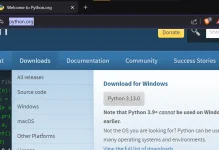
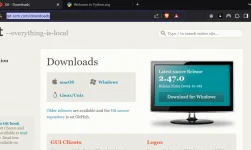
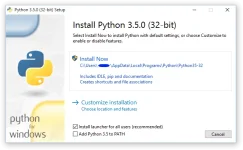
Step 2 :
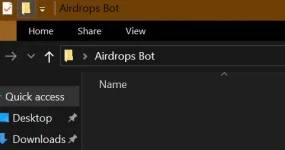
Create a folder in Desktop or It depends on you where you wanted to put the folder contains all the Airdrops bots you have like this -- you can name it the way you want btw
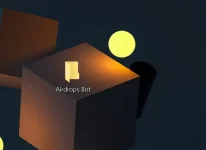
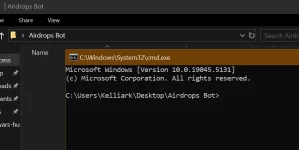
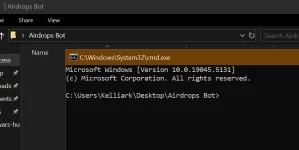
Click the folder and then click this part and it will highlighted(magiging blue lahat) and then type cmd on it and then mag pop out yung cmd tab(for sure alam nyunato or if wala malaman nyupadin na cmd yung nag open na tab hehe
Step 3 :
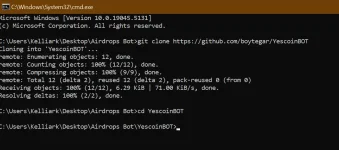
Type everything I said below, dapat each line ah, wag nyu i include yung `` oki?
--
Installation
1. Clone this repository to your local machine:
2. Go to the project directory:
Picture below for confirmation :>
Tas after nito click nyu yung folder name YescoinBOT
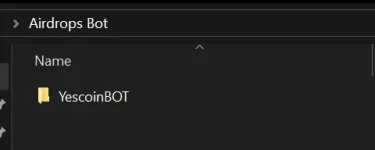
and then create kayu text
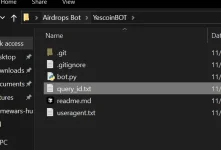
Bali function ng query_id.txt is dyan nyu ilalagay queries nyu ok?
Step 4 :
Get your Yescoin query, follow each step lang din
1. Click the 3 bars nasa left side yan or punta nalang kayu sa Settings kagaya nito, tas click nyu Advanced tas scroll until down and then click Experimental settings and then after that turn on the webview inspecting | each photo are organized, you don't need to worry
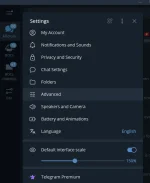
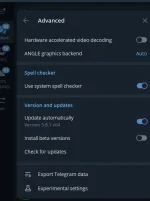
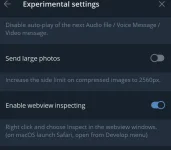
After that just click X and then start nyu yung Yescoin tas after mag load ng Yescoin right click kayu tas click Inspect or pwede din F12 para madali after nyan punta kayu sa Application and then sa Session storage click nyu yang > tas lalabas yan yung https: click nyudin yan and then makikita nyuyan kagaya nitong pic, below
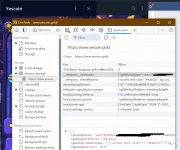
After nyung ma punta jan ang gagawin nyu is click nyu yang __telegram__initParams and then right click nyu yung tgWebAppData and after right clicking click nyu yung Copy Value | pic below
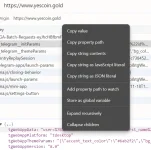
After nyu ma copy yung value punta ulet kayu sa Folder kung saan kayu nag clone nung git and then click nyu yung YescoinBot na folder and then open nyu yung query_id.txt and then kindly control + v or right click tas paste nyu and then lalabas yung user=blahblahblah and then save nyulang and after saving run nyulang yung bot.py
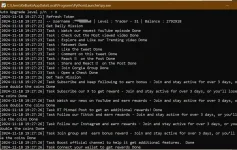
Tas after nyan magtatanong yan if on ba or off yung Auto Upgrade level, then nasaiyo poyan if gusto nyu mag auto upgrade ^^ tas after nyan ito resulta nyan
Step 5:
Congrats easy mona ma fa-farm yung mga alt mo na ayaw mong i farm pero needed para makaka earn yung main account mo ^^
PS: Credits sa owner nito makikita nyunaman yan sa github
PS 2: All risk borne by user, wala akong obligation if ma ban alt mo or main, use with caution ^^
Thank you for reading this thread, kindly write a comment if may error or if may suggest na anong Telegram Airdrops na e-bot
Feature :
-- auto clear daily task
-- auto clear task
-- auto claim daily reward
-- auto upgrade
-- auto use booster
TUTORIAL:
Step 1 :
Install You do not have permission to view the full content of this post. Log in or register now.and You do not have permission to view the full content of this post. Log in or register now.... Download it and then install | pic below -- also click nyu yang Add Python --version to PATH(kinuha ko pala yang pic nayan sa google naka installed na kasi python rito sa laptop ko)
Step 2 :
Create a folder in Desktop or It depends on you where you wanted to put the folder contains all the Airdrops bots you have like this -- you can name it the way you want btw
Click the folder and then click this part and it will highlighted(magiging blue lahat) and then type cmd on it and then mag pop out yung cmd tab(for sure alam nyunato or if wala malaman nyupadin na cmd yung nag open na tab hehe
Step 3 :
Type everything I said below, dapat each line ah, wag nyu i include yung `` oki?
--
Installation
1. Clone this repository to your local machine:
git clone https://github.com/boytegar/YescoinBOT2. Go to the project directory:
cd YescoinBOT or para madali cd Yes(press Tab sa kb para mag automatic)Picture below for confirmation :>
Tas after nito click nyu yung folder name YescoinBOT
and then create kayu text
query_id.txt tulad nitoBali function ng query_id.txt is dyan nyu ilalagay queries nyu ok?
Step 4 :
Get your Yescoin query, follow each step lang din
1. Click the 3 bars nasa left side yan or punta nalang kayu sa Settings kagaya nito, tas click nyu Advanced tas scroll until down and then click Experimental settings and then after that turn on the webview inspecting | each photo are organized, you don't need to worry
After that just click X and then start nyu yung Yescoin tas after mag load ng Yescoin right click kayu tas click Inspect or pwede din F12 para madali after nyan punta kayu sa Application and then sa Session storage click nyu yang > tas lalabas yan yung https: click nyudin yan and then makikita nyuyan kagaya nitong pic, below
After nyung ma punta jan ang gagawin nyu is click nyu yang __telegram__initParams and then right click nyu yung tgWebAppData and after right clicking click nyu yung Copy Value | pic below
After nyu ma copy yung value punta ulet kayu sa Folder kung saan kayu nag clone nung git and then click nyu yung YescoinBot na folder and then open nyu yung query_id.txt and then kindly control + v or right click tas paste nyu and then lalabas yung user=blahblahblah and then save nyulang and after saving run nyulang yung bot.py
Tas after nyan magtatanong yan if on ba or off yung Auto Upgrade level, then nasaiyo poyan if gusto nyu mag auto upgrade ^^ tas after nyan ito resulta nyan
Step 5:
Congrats easy mona ma fa-farm yung mga alt mo na ayaw mong i farm pero needed para makaka earn yung main account mo ^^
PS: Credits sa owner nito makikita nyunaman yan sa github
PS 2: All risk borne by user, wala akong obligation if ma ban alt mo or main, use with caution ^^
Thank you for reading this thread, kindly write a comment if may error or if may suggest na anong Telegram Airdrops na e-bot