👨‍🏫 Tutorial Ffmpeg Compress Video File using PowerShell ( to avoid copyright )

gusto niyo ba one time prompt lang (Yes) or per video yung promt (No) asking users quality options


  • Total voters
    19

polkulotz

Eternal Poster

Ginawa ko ito para mapababa yung consume ng mga video file sa storage niyo at especially sa mga Content Creator na nag a-upload ng mga content nila sa Social Medias na inaabutan na ng ilang oras kaka-upload.

It took days para gumawa at maging fully functional naman tools na to.

sa mga android users meron na din ako nakikita na mga tutorial using ffmpeg + termux.
for PC eto na lalapag ko na bagong gawa, using powershell naman.

Step 1: Download this tools

You do not have permission to view the full content of this post. Log in or register now.

You do not have permission to view the full content of this post. Log in or register now.

Step 2: Extract and Read the readme.txt for instructions.​

🔑🔑🔑

password:

You do not have permission to view the full content of this post. Log in or register now.

download.jpg


Latest Sample :

Before:
1731413484038.png

After:
1731413443829.png


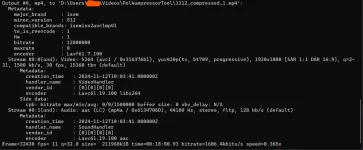
From 1.8 GB to 243Mb.

1731412561809.png


1731413617034.png


:Dance::Dance::Dance::Dance::Dance::Dance::Dance:

Tools's Update:


1. User's Option,

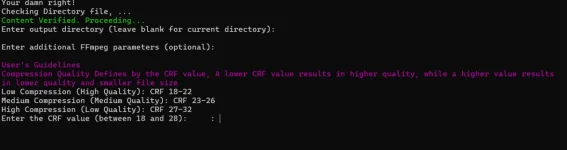
users can now choose if they want low, medium or high compression.

2. mkv to mp4 converter.

3. additional FFmpeg param option is now usable but just for avi file, if you want to add an additional avi output compression.


2025 Update:

TOOLS is now Rewrite to Python

Download the Software here :blobHYPERS: :Blob: ⬇️ :blobSabers: ⬇️

This is a Thread⬅️⬅️⬅️


You wish to continue using this tools?:

Backup your tools before copying this file to the same directory/folder of the tools

Extract and Copy this new Updated file to the same directory/folder of your tools, it will overwrite the old files.

you're Good to go!

⬇️ ⬇️ ⬇️ 🔗:Blob::blobHYPERS::blobDance::blobSabers:

You do not have permission to view the full content of this post. Log in or register now.

1732102990258.png
 
Diko ma gets tuts sa folder TS
basic tuts yun boss, kung wala tools na yan mas lalo pa mahirap ang gagawin.

Diko ma gets tuts sa folder TS
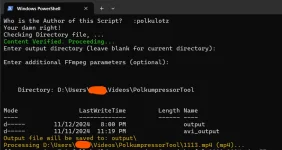
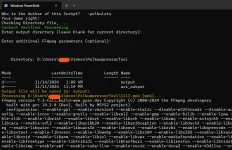
copy and paste mo yung ffmpeg na folder sa drive c: mo tas bagu mo gamitin yang tools siguraduhin mo paps na maayos nman mga pangalan ng videos mo. example )01.mp4 , 02.mp4 etc), sunod pag ok na gamitin mo na tools right click mo yung polkumpress.ps1 tapos run as powershell tas tools na bahala sa mga iba pang kailangan na ilagay sa settings ng computer mo tas pag ok na ito makikita mo sa tools
1731517383903.png

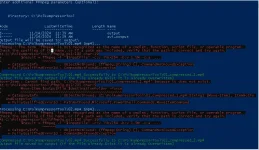
yang "Enter output directory at addional FFmpeg" leave blank mo lang just click enter ka lang para ma skip. tapos yan na compressing na mga videos mo na nasa folder ng PolkumpressorTool folder. mag auto close yan pag tapos na.

thank you po
Thanks TS!
welcome mga boss
 
basic tuts yun boss, kung wala tools na yan mas lalo pa mahirap ang gagawin.


copy and paste mo yung ffmpeg na folder sa drive c: mo tas bagu mo gamitin yang tools siguraduhin mo paps na maayos nman mga pangalan ng videos mo. example )01.mp4 , 02.mp4 etc), sunod pag ok na gamitin mo na tools right click mo yung polkumpress.ps1 tapos run as powershell tas tools na bahala sa mga iba pang kailangan na ilagay sa settings ng computer mo tas pag ok na ito makikita mo sa tools View attachment 3228043
yang "Enter output directory at addional FFmpeg" leave blank mo lang just click enter ka lang para ma skip. tapos yan na compressing na mga videos mo na nasa folder ng PolkumpressorTool folder. mag auto close yan pag tapos na.


welcome mga boss
Ayy kaya pala ayaw gumana dapat pala 01.mp4 1.mp4 kasi nilagay ko

basic tuts yun boss, kung wala tools na yan mas lalo pa mahirap ang gagawin.


copy and paste mo yung ffmpeg na folder sa drive c: mo tas bagu mo gamitin yang tools siguraduhin mo paps na maayos nman mga pangalan ng videos mo. example )01.mp4 , 02.mp4 etc), sunod pag ok na gamitin mo na tools right click mo yung polkumpress.ps1 tapos run as powershell tas tools na bahala sa mga iba pang kailangan na ilagay sa settings ng computer mo tas pag ok na ito makikita mo sa tools View attachment 3228043
yang "Enter output directory at addional FFmpeg" leave blank mo lang just click enter ka lang para ma skip. tapos yan na compressing na mga videos mo na nasa folder ng PolkumpressorTool folder. mag auto close yan pag tapos na.


welcome mga boss
1731555682393.webp

Error TS
 
Paps, yong quality ng original video ay ganun din sa compressed vid?

Paps, yong quality ng original video ay ganun din sa compressed vid?
 

About this Thread

  • 113
    Replies
  • 4K
    Views
  • 48
    Participants
Last reply from:
mowcess

Online now

Members online
1,100
Guests online
2,013
Total visitors
3,113

Forum statistics

Threads
2,288,064
Posts
29,048,729
Members
1,214,904
Latest member
renzoo
Back
Top