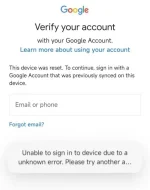
👨‍🏫 Tutorial How to fix "Unable to sign in due to UNKNOWN Error" on Android15

Hazama

Save me ✋
Elite
1731235232620.webp


1. Download the ALL Reboot Tool v3.0 on your PC.
2. Open the tool and select "FRP" from the top menu.
3. Connect your device in fastboot mode and choose "General Mobile" in the tool on your PC.
4. In the command prompt that opens, press Enter.

Download Link:
You do not have permission to view the full content of this post. Log in or register now.
 

About this Thread

  • 4
    Replies
  • 678
    Views
  • 3
    Participants
Last reply from:
Hazama

Online now

Members online
1,036
Guests online
1,316
Total visitors
2,352

Forum statistics

Threads
2,273,301
Posts
28,948,716
Members
1,235,691
Latest member
elayjah
Back
Top