 PH
PHYumYum AIRDROP HUNTER
Forum Expert
Backed by the top chads and VCs in crypto.
This is 100% free and easy to farm.
Open thread for alpha guide 
register here

Phase 1 of the airdrop campaign is currently ongoing.
If you join now, you will be way ahead 10 million people.
Sign up with Email/Google
• Go to: You do not have permission to view the full content of this post. Log in or register now.
• Sign up with Email
• Input code for 2% boost and 3000 EXP: FJMSPT
 If you skip using the code, you won't get the welcome bonus and lifetime boost for all your points.
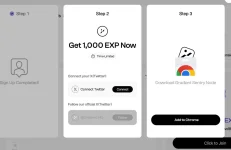
Connect X and Install Extension
• Connect your Twitter account
• Follow the Gradient
• Click "Add to chrome" that is Step 3.
• Proceed to "Add to chrome"
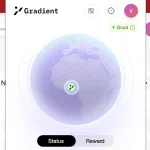
If your extension shows "Good" it means you are all set and ready to accumulate points.
To accumulate more points,
• Login your account to multiple devices: Use the steps above.
• Make sure internet is connected to your device often.
Refer your enemies to start farming 
How to Fix Unsupported Error
For Laptop Users;
• On your Gradient dashboard, proceed to Log out.
• Switch off your Laptop
• Switch off the source of your internet e.g Mobile phone, Router.
Wait for a couple of minutes before turning on both your device and internet source.
• Connect your internet again to your laptop
• Login to Gradient
You should be able to see the "Good" status on your Gradient to show it has been fixed.
 For Mobile Users;
• Log out of Gradient
• Switch off your mobile
• Wait for some minutes then turn your mobile on
• Log in to Gradient.
You should be able to see the "Good" status on your Gradient to show it has been fixed.
If this doesn't work, it probably means you are using a Static IP.
You need to be on Dynamic IP.
How to know if your IP is Static or Dynamic?
• Go to the Network settings on the device you are using for the internet e.g your mobile or router.
• Take note of your IP.
• Turn off the device and put it back on after a while.
• Check your network settings to see if the IP changed.
If it is still the same, it means you are on Static.
How to Switch from Static to Dynamic?Call your Internet Service Provider and request they switch your IP from Static to Dynamic.

 maybe yung mga guide dito maka help sayo, like contact the provider na ibahin internet mo ganon