 PH
PHEagleEye04
Eternal Poster

*First step: set those that seen below under default apn .
proxy: 31.13.66.6
port: 80
Use proxy authentication [✓]
Proxy username: [any]
Proxy password: [any]
*Second step: Go to psiphon more setting/setting
set those that seen below.
Connect through an HTTP.. [✓]
Use the following setting.. [*]
Host Address: 31.13.66.37
Port: 80
However, step 2 "use the following setting" is optional coz there are psiphon apps that doesn't work with system network setting.
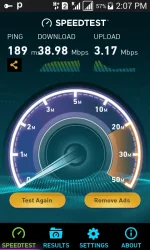
Kung ako sa inyo, hanap kayo ng psiphon any version na tumatanggap ng "Use system network setting" dahil halamimaw ang speed na bigay non kapag gamit ay Japan location. Walang capping capping dahil default apn gamit natin.
Note:Download Psiphon in google play store, or use your modded psiphon.
Or try this >> You do not have permission to view the full content of this post. Log in or register now.
Don't forget, Psiphon speed limit: unlimited
Thank you!on/off data if failed to connect.
Sorry for those not Establish yet, keep on moving guys! I won't entertain pm.
Please million likes please!!
 dagdagan mo nalang ng madaming 0
