 PH
PHMr_The Real
Forum Veteran
Gradient Airdrop Update 
If your Gradient displays Unsupported, here's how to fix it in a few minutes.
 Reasons why you might be getting Unsupported Error.
If you are getting the Unsupported error; IP Proxy service related, it means your internet connection has been flagged.
Most people who experience this are those who are using one internet connection for multiple devices.
Even if you are using one account on multiple devices, the internet supply to each device must be from different networks.
If you can't afford to have different internet for different devices, stick to one device and one internet.
If you are also sharing the internet with another user farming Gradient, this is a big red flag and will lead to an Unsupported error.
Lastly, avoid using VPNs or anything that might affect your IP.
Before diving into the steps to fix this,
1. Log out your Gradient from all other devices except the device you want to be using.
2. Stop sharing the internet you are using for Gradient with other Gradient farmers.
3. Stop using VPNs when Gradient is logged in.
Now let's fix it
How to Fix Unsupported Error
For Laptop Users;
• On your Gradient dashboard, proceed to Log out.
• Switch off your Laptop
• Switch off the source of your internet e.g Mobile phone, Router.
Wait for a couple of minutes before turning on both your device and internet source.
• Connect your internet again to your laptop
• Login to Gradient
You should be able to see the "Good" status on your Gradient to show it has been fixed.
For Mobile Users;
• Log out of Gradient
• Switch off your mobile
• Wait for some minutes then turn your mobile on
• Log in to Gradient.
You should be able to see the "Good" status on your Gradient to show it has been fixed.
If this doesn't work, it probably means you are using a Static IP.
You need to be on Dynamic IP.
How to know if your IP is Static or Dynamic?
• Go to the Network settings on the device you are using for the internet e.g your mobile or router.
• Take note of your IP.
• Turn off the device and put it back on after a while.
• Check your network settings to see if the IP changed.
If it is still the same, it means you are on Static.
How to Switch from Static to Dynamic?
Call your Internet Service Provider and request they switch your IP from Static to Dynamic.
Share to others.
CTTO.
Code: HPDQOI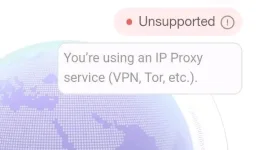
If your Gradient displays Unsupported, here's how to fix it in a few minutes.
Reasons why you might be getting Unsupported Error.If you are getting the Unsupported error; IP Proxy service related, it means your internet connection has been flagged.
Most people who experience this are those who are using one internet connection for multiple devices.
Even if you are using one account on multiple devices, the internet supply to each device must be from different networks.
If you can't afford to have different internet for different devices, stick to one device and one internet.
If you are also sharing the internet with another user farming Gradient, this is a big red flag and will lead to an Unsupported error.
Lastly, avoid using VPNs or anything that might affect your IP.
Before diving into the steps to fix this,
1. Log out your Gradient from all other devices except the device you want to be using.
2. Stop sharing the internet you are using for Gradient with other Gradient farmers.
3. Stop using VPNs when Gradient is logged in.
Now let's fix it
How to Fix Unsupported ErrorFor Laptop Users;
• On your Gradient dashboard, proceed to Log out.
• Switch off your Laptop
• Switch off the source of your internet e.g Mobile phone, Router.
Wait for a couple of minutes before turning on both your device and internet source.
• Connect your internet again to your laptop
• Login to Gradient
You should be able to see the "Good" status on your Gradient to show it has been fixed.
For Mobile Users;• Log out of Gradient
• Switch off your mobile
• Wait for some minutes then turn your mobile on
• Log in to Gradient.
You should be able to see the "Good" status on your Gradient to show it has been fixed.
If this doesn't work, it probably means you are using a Static IP.
You need to be on Dynamic IP.
How to know if your IP is Static or Dynamic?• Go to the Network settings on the device you are using for the internet e.g your mobile or router.
• Take note of your IP.
• Turn off the device and put it back on after a while.
• Check your network settings to see if the IP changed.
If it is still the same, it means you are on Static.
How to Switch from Static to Dynamic?Call your Internet Service Provider and request they switch your IP from Static to Dynamic.
Share to others.
CTTO.
Code: HPDQOI