PH
PHPayamanBoy
Forum Veteran
Nakapag-withdraw ka na ba lods kahit puro impressions lang yung ads mo? Like gamit yung trick na pinost mo. Curious lang since madali kasi mag-earn dito HAHAHAHAmay mali sa pag paste mo ng links, may nawawa sigurong '
Nakapag-withdraw ka na ba lods kahit puro impressions lang yung ads mo? Like gamit yung trick na pinost mo. Curious lang since madali kasi mag-earn dito HAHAHAHAmay mali sa pag paste mo ng links, may nawawa sigurong '
ayun may kulang nga comma galing mo talaga mastermay mali sa pag paste mo ng links, may nawawa sigurong '
para saan to master?Ito ginawa ko guys, punta kayo com. shops. happy farming.
Follow the Steps
- Create a Shortcut:
- Right-click on your index.html file, and select Create shortcut.
- Place the shortcut on your desktop or any convenient location.
- Move the Shortcut to the Startup Folder:
- Press Win + R to open the Run dialog box.
- Type shell:startup and press Enter. This will open the Startup folder.
- Drag and drop (or copy-paste) your index.html shortcut into this folder.
- Assign a Default Browser to Open HTML Files (if necessary):
- Right-click on your index.html file, select Open with > Choose another app.
- Select your preferred browser, and check the box Always use this app to open .html files.
Kumusta naman ang earnings mo gamit yan lods?Ito ginawa ko guys, punta kayo com. shops. happy farming.
Follow the Steps
- Create a Shortcut:
- Right-click on your index.html file, and select Create shortcut.
- Place the shortcut on your desktop or any convenient location.
- Move the Shortcut to the Startup Folder:
- Press Win + R to open the Run dialog box.
- Type shell:startup and press Enter. This will open the Startup folder.
- Drag and drop (or copy-paste) your index.html shortcut into this folder.
- Assign a Default Browser to Open HTML Files (if necessary):
- Right-click on your index.html file, select Open with > Choose another app.
- Select your preferred browser, and check the box Always use this app to open .html files.
di kaya maglaho acc mo jaanayun may kulang nga comma galing mo talaga master
para saan to master?
maglalaho nga daw master haha kaya dummy langdi kaya maglaho acc mo jaan
tama rak ka muna 50 dolersmaglalaho nga daw master haha kaya dummy lang
bropa bulong sa cpm momay limit siguro sa mga walang sites haha
tara master hahatama rak ka muna 50 dolers
ayun may kulang nga comma galing mo talaga master
para saan to master
para pag may nag-open ng PC sa com. shop, auto run na sya sa localayun may kulang nga comma galing mo talaga master
para saan to master?
Pwede mo naman ata palitan ang main email ng paypal mo lods ng dummy email mo para ma receive mo paymentpaano if dummy email ginamit lods?
opo ngayong araw makukuha ko na, sabi nang adsterra nasent na daw wait ko nalang.Nakapag-withdraw ka na ba lods kahit puro impressions lang yung ads mo? Like gamit yung trick na pinost mo. Curious lang since madali kasi mag-earn dito HAHAHAHA
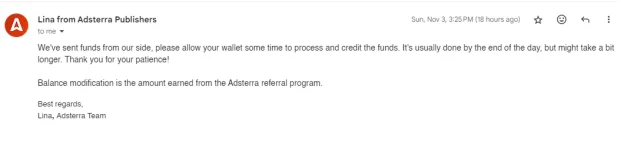
okay lang yan
Gumawa ako paypal gamit dummy lods. Gamit same info hahahha. Temporary lang naman. Once na magamit ko, papalitan ko na payment method na cryptoPwede mo naman ata palitan ang main email ng paypal mo lods ng dummy email mo para ma receive mo payment
may mali sa pag paste mo ng links, may nawawa sigurong '
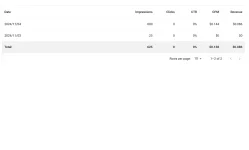
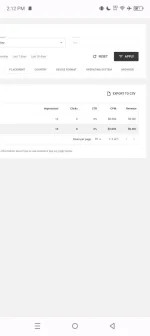
check stats lods kung gumagana yung impressions
magkano yung withdraw mo boss?opo ngayong araw makukuha ko na, sabi nang adsterra nasent na daw wait ko nalang.
View attachment 3203456
okay lang yan
pwede mo naman iright click deretso tapos open with chromeIto ginawa ko guys, punta kayo com. shops. happy farming.
Follow the Steps
- Create a Shortcut:
- Right-click on your index.html file, and select Create shortcut.
- Place the shortcut on your desktop or any convenient location.
- Move the Shortcut to the Startup Folder:
- Press Win + R to open the Run dialog box.
- Type shell:startup and press Enter. This will open the Startup folder.
- Drag and drop (or copy-paste) your index.html shortcut into this folder.
- Assign a Default Browser to Open HTML Files (if necessary):
- Right-click on your index.html file, select Open with > Choose another app.
- Select your preferred browser, and check the box Always use this app to open .html files.
80 lang sa ngayon, the rest next payment nacheck stats lods kung gumagana yung impressions
magkano yung withdraw mo boss?
wala naman atang payment information na kailangan pag paypal. email langtanong lang. Paypal yung pinili ko tas hindi ako maka set up ng payment information pano yan?
hahaha GGGumawa ako paypal gamit dummy lods. Gamit same info hahahha. Temporary lang naman. Once na magamit ko, papalitan ko na payment method na crypto