 PH
PHNot everyone likes to have a master password, PIN or Pattern lock applied their smartphone at all times. It becomes quite tiresome if a friend is playing around with your android phone, and you have to enter the unlock code every time the screen times out. Then again, you might not want your SMS threads, Gallery, Play Store, and Email, Facebook Messenger or other social networking apps unprotected while one of your mischievous friends are playing game on your phone. It is in such situations that apps like AppLock for Android comes in handy.

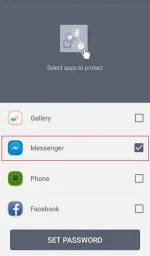
AppLock lets you lock individual users, system apps and download apps with a PIN, Passcode or Pattern lock of your choice. When you enable the AppLock for the first time, it automatically presents you the apps you want lock down:
Select apps you want to protect with AppLock:
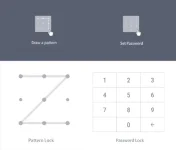
And then set a PIN or Pattern lock for locked apps. AppLock offers two different types of password for you, you can switch between Passcode and Pattern lock as you wish:
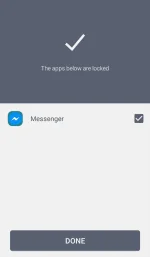
Then the selected apps you want to protect will be listed under the Application Lock Tab:
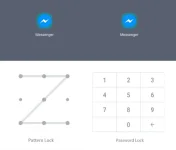
So every time you want unlock the app, you have tape the right password to unlock it successfully:
Other the Intruder Selfie will take pictures of those who want to try to break in your phone snooping around your phone privacy. NOTE: The photo of the intruder will not be shown until the app that the intruder wants to break in is unlocked.

Apart from taking intruder selfie, you can tape wrong password by accident to catch funny or hilarious moment of your friends to make fun of them.

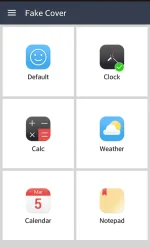
If you want to try other cool features, AppLock has the Fake Cover function. You can choose Clock, Calculate, Weather, Calendar, or Notepad to disguise the snoopers without letting them know you are using the AppLock to protect you phone privacy.
Select your favorite icon to replace the AppLock icon:
More Options:
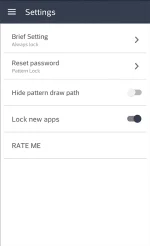
Find more options on the main page of AppLock(Slide to left---Settings)
-Brief Setting:Change the app lock frequency with Always Lock, Lock 5 minutes and Until Screen Off
-Reset Password: Conveniently and easily switch PIN lock and Pattern Lock
-Hide Pattern Draw Path: Unlock the locked apps to keep the snooper from peeping your password
-Lock New Apps: Inform you the newly download apps of being locked for better protection.
NOTE:
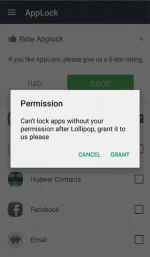
For android operating system up 5.0+, you have to accept the permission, otherwise you can access the locked apps without taping the password:
AppLock is now available on Play Store, click the link below to learn more information about AppLock:
You do not have permission to view the full content of this post. Log in or register now.
If you have any question with AppLock, please contact: support@ivymobile.com
AppLock lets you lock individual users, system apps and download apps with a PIN, Passcode or Pattern lock of your choice. When you enable the AppLock for the first time, it automatically presents you the apps you want lock down:
Select apps you want to protect with AppLock:
And then set a PIN or Pattern lock for locked apps. AppLock offers two different types of password for you, you can switch between Passcode and Pattern lock as you wish:
Then the selected apps you want to protect will be listed under the Application Lock Tab:
So every time you want unlock the app, you have tape the right password to unlock it successfully:
Other the Intruder Selfie will take pictures of those who want to try to break in your phone snooping around your phone privacy. NOTE: The photo of the intruder will not be shown until the app that the intruder wants to break in is unlocked.
Apart from taking intruder selfie, you can tape wrong password by accident to catch funny or hilarious moment of your friends to make fun of them.
If you want to try other cool features, AppLock has the Fake Cover function. You can choose Clock, Calculate, Weather, Calendar, or Notepad to disguise the snoopers without letting them know you are using the AppLock to protect you phone privacy.
Select your favorite icon to replace the AppLock icon:
More Options:
Find more options on the main page of AppLock(Slide to left---Settings)
-Brief Setting:Change the app lock frequency with Always Lock, Lock 5 minutes and Until Screen Off
-Reset Password: Conveniently and easily switch PIN lock and Pattern Lock
-Hide Pattern Draw Path: Unlock the locked apps to keep the snooper from peeping your password
-Lock New Apps: Inform you the newly download apps of being locked for better protection.
NOTE:
For android operating system up 5.0+, you have to accept the permission, otherwise you can access the locked apps without taping the password:
AppLock is now available on Play Store, click the link below to learn more information about AppLock:
You do not have permission to view the full content of this post. Log in or register now.
If you have any question with AppLock, please contact: support@ivymobile.com


