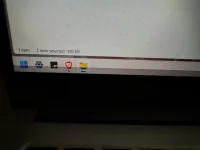
❓ Help Taskbar/screen of laptop

Status
Not open for further replies.
IMG_20241030_182030.webp


mga kaPHC pahelp naman kung ano itong gray area sa taskbar or sa baba ng laptop screen ko. nag umpisa ito kunti lang hanggang sa lumalaki na..

sana meron makatulong
 
Hello! Based on your description, it seems like you are experiencing an issue with a growing gray area on your laptop screen or taskbar. This could be caused by a number of factors, including graphics driver issues, display settings, or even a physical problem with the screen itself.

Here are some steps you can try to troubleshoot and hopefully resolve the issue:

1. Restart Your Laptop: Sometimes a simple restart can fix minor display issues.

2. Update Graphics Drivers: Outdated or corrupted graphics drivers can cause display problems. Try updating your graphics drivers to see if it resolves the issue.

3. Adjust Display Settings: Check your display settings to see if there are any unusual settings that could be causing the gray area. You can also try adjusting the resolution to see if that helps.

4. Check for Physical Damage: Inspect your laptop screen for any physical damage, such as cracks or pressure marks, that could be causing the gray area.

5. Run Display Troubleshooters: Windows has built-in troubleshooters that can help identify and fix display issues. You can access these through the Settings menu.

6. Connect to External Monitor: If possible, connect your laptop to an external monitor to see if the issue persists. This can help determine if the problem is with the laptop screen itself.

If none of these steps resolve the issue, it may be a hardware problem that requires professional repair. In that case, I recommend reaching out to a technician or the manufacturer for further assistance.

I hope these suggestions help you troubleshoot and fix the growing gray area on your laptop screen or taskbar. Let me know if you have any other questions or if you need further assistance!
 
screen na yan bossing dead pixels na yan natamaan lcd or led mo nyan solustion lang dyan either ikaw mag rerepair or mag babayad ka ng screen mo kung ikaw naman mag rerepair dapat alam mo inch at specs required para sa screen na yan
 
TS, try mo sa ibang monitor, kung ganyan din ang resulta, nasa display setting/driver ang problema. Kung walang grey area sa monitor, nasa display panel na mismo ang problema, pa-check mo sa technician baka mai-salba pa otherwise palit screen panel mo na, makikita mo yung model number niyan sa likod nung panel.
 
meron akong friend na may laptop nitro 5 ganyan din hangang sa half na ng screen yung damage dinaman nabagsak or tinamaan ng kahit ano pero pag may external monitor okay naman, kahit update ng driver ganon parin ang ginawa ko lang gumawa ako ng custom reso using

You do not have permission to view the full content of this post. Log in or register now.

binabaan ko rin yung frame rate ng kaunti from 140 - 138/135 tapos okay na
diko sinasabi na gagana sayo/salahat pero give it a try malay mo ma fix bos
sana makatulong
 
meron akong friend na may laptop nitro 5 ganyan din hangang sa half na ng screen yung damage dinaman nabagsak or tinamaan ng kahit ano pero pag may external monitor okay naman, kahit update ng driver ganon parin ang ginawa ko lang gumawa ako ng custom reso using

You do not have permission to view the full content of this post. Log in or register now.

binabaan ko rin yung frame rate ng kaunti from 140 - 138/135 tapos okay na
diko sinasabi na gagana sayo/salahat pero give it a try malay mo ma fix bos
sana makatulong
kung reset ko na lang ko lods..maaayus kaya? di ko naman po ito nabagsak or super hinampas screen ko..
 
Status
Not open for further replies.

Similar threads

About this Thread

  • 11
    Replies
  • 688
    Views
  • 8
    Participants
Last reply from:
Wrecca

Trending Topics

Online now

Members online
513
Guests online
1,265
Total visitors
1,778

Forum statistics

Threads
2,273,558
Posts
28,950,350
Members
1,235,817
Latest member
dreamnail
Back
Top