PH
PHjayjayvirus
Established
Bitin pa pasupport muna
Boss pano mo napagana pahelp naman poWorking.. try ko maya kung kaya haha.. Thankies
View attachment 3192728
May limit pala sya
Edit: Reset pala limit every 10mins kaya ayos hahaha
View attachment 3192826
Pero working haha
View attachment 3192827
Nagpagawa lang ako ng chat script sa ᑕᕼᗩTGᑭTBoss pano mo napagana pahelp naman po
YOUR_API_KEYHello, how are you? kung ano gusto mo itanong bago mo i-run yung pythonsalamat boss, d na kailangan mag design heheNagpagawa lang ako ng chat script sa ᑕᕼᗩTGᑭT
Eto
Download
lagay mo api mo saYOUR_API_KEY
gamitin mo index.php kung may host ka or kung kaya mo paganahin sa xampp, sakin kasi ayaw sa xampp
basic interface lang yan at hindi din continues conversation, ikaw na mag-upgrade
kung maalam ka naman sa python gamitin mo api.py
edit mo langHello, how are you?kung ano gusto mo itanong bago mo i-run yung python
yung sagot nya ipi-print sa output.txt
ikaw nalang din mag-upgrade ng code for your convenience
Kung gusto mo mabilis mag design, gamit ka blackbox.ai/screenshotsalamat boss, d na kailangan mag design hehe

Boss maraming salamat po nahihirapan po ako puro failed to fetch hahahaha newbie lang poNagpagawa lang ako ng chat script sa ᑕᕼᗩTGᑭT
Eto
Download
lagay mo api mo saYOUR_API_KEY
gamitin mo index.php kung may host ka or kung kaya mo paganahin sa xampp, sakin kasi ayaw sa xampp
basic interface lang yan at hindi din continues conversation, ikaw na mag-upgrade
kung maalam ka naman sa python gamitin mo api.py
edit mo langHello, how are you?kung ano gusto mo itanong bago mo i-run yung python
yung sagot nya ipi-print sa output.txt
ikaw nalang din mag-upgrade ng code for your convenience
Ayos ahh, pwede pala yun hahaang haba na pala nito ngayon ko lang ulit nabisita.
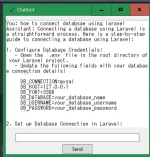
View attachment 3206162
yung ginawa skaen ng ai para gumawa ng chatbot sa python na may ui. susme AHAHAHHA
ou boss ahahahaAyos ahh, pwede pala yun haha
Ako din naman walang alam jan, papatulong lang di ako sa aiBoss maraming salamat po nahihirapan po ako puro failed to fetch hahahaha newbie lang po

mas okay si claude when coding pansin ko lang. yun din gamit ko e. imbis gpt 4. pansin ko lang kapag nag papa decode ako minsan sensitive si claude ayaw i decode si gpt dinedecode kahit konte HAHAAAko din naman walang alam jan, papatulong lang di ako sa ai
try mo patulong sa dito
designs.ai
[Hidden content]
recomended ko gamitin mo sa chat yung claude 3.5 sonnet, para sakin mas maayos sagot nya at mas consistent pag dating sa coding kesa gpt4, pero tinatry ko parin sa gpt4 pag di nya makuha gusto ko
Thanks.. pero sa web muna ako, tapos na kasi yung chat interface koou boss ahahaha
eto full code nyan.
import requests
import tkinter as tk
from tkinter import ttk
API_URL = "You do not have permission to view the full content of this post. Log in or register now."
API_KEY = "1c5c56b1-fdbc-45d9-b3b1-9f4b4e645f0a"
def send_message(user_input):
headers = {
"x-api-key": API_KEY,
"Content-Type": "application/json"
}
data = {
"model": "gpt-4",
"messages": [
{"role": "user", "content": user_input}
]
}
response = requests.post(API_URL, headers=headers, json=data)
if response.status_code == 200:
response_data = response.json()
assistant_reply = response_data["choices"][0]["message"]["content"]
return assistant_reply
else:
return "Error: Unable to get response from the API."
def on_send_click():
user_input = user_input_entry.get()
conversation_text.insert(tk.END, "You: " + user_input + "\n")
user_input_entry.delete(0, tk.END)
assistant_reply = send_message(user_input)
conversation_text.insert(tk.END, "Assistant: " + assistant_reply + "\n")
window = tk.Tk()
window.title("Chatbot")
conversation_text = tk.Text(window, height=20, width=50)
conversation_text.pack(pady=10)
user_input_entry = ttk.Entry(window, width=50)
user_input_entry.pack(pady=5)
send_button = ttk.Button(window, text="Send", command=on_send_click)
send_button.pack()
window.mainloop()
d lang ayos indent teka lagay ko sa ctxt
You do not have permission to view the full content of this post. Log in or register now.
Legal po ba to ?ou boss ahahaha
eto full code nyan.
import requests
import tkinter as tk
from tkinter import ttk
API_URL = "You do not have permission to view the full content of this post. Log in or register now."
API_KEY = "1c5c56b1-fdbc-45d9-b3b1-9f4b4e645f0a"
def send_message(user_input):
headers = {
"x-api-key": API_KEY,
"Content-Type": "application/json"
}
data = {
"model": "gpt-4",
"messages": [
{"role": "user", "content": user_input}
]
}
response = requests.post(API_URL, headers=headers, json=data)
if response.status_code == 200:
response_data = response.json()
assistant_reply = response_data["choices"][0]["message"]["content"]
return assistant_reply
else:
return "Error: Unable to get response from the API."
def on_send_click():
user_input = user_input_entry.get()
conversation_text.insert(tk.END, "You: " + user_input + "\n")
user_input_entry.delete(0, tk.END)
assistant_reply = send_message(user_input)
conversation_text.insert(tk.END, "Assistant: " + assistant_reply + "\n")
window = tk.Tk()
window.title("Chatbot")
conversation_text = tk.Text(window, height=20, width=50)
conversation_text.pack(pady=10)
user_input_entry = ttk.Entry(window, width=50)
user_input_entry.pack(pady=5)
send_button = ttk.Button(window, text="Send", command=on_send_click)
send_button.pack()
window.mainloop()
d lang ayos indent teka lagay ko sa ctxt
You do not have permission to view the full content of this post. Log in or register now.
Mas ok nga sya.. kahapon ko lang din natry yan claude, nabwisit kasi ako sa gpt4, pag may pinaayos ako may ibang lalabas na error HAHAHAmas okay si claude when coding pansin ko lang. yun din gamit ko e. imbis gpt 4. pansin ko lang kapag nag papa decode ako minsan sensitive si claude ayaw i decode si gpt dinedecode kahit konte HAHAA

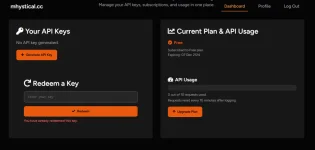
pano yan lods? patuts naman huhu di ko alam gamitinView attachment 3199617
Working lodi salamat po