❓ Help Trying to put windows on ssd

Status
Not open for further replies.

TunogLata

Forum Veteran
Good AM/PM mga ka phc
Nag try po ako arch linux sa isang extrang ssd ko then after removing batt then change ssd to my main which is windows 10 ayaw napo ma detect sa boot menu yung windows ko kaya bumalik po ako sa linux tas after trying to fix wala parin so ginawa ko ni format ka nalang to ntfs which is successful naman but now im trying na to installan ng windows 10 sa bootable usb ko na ventoy may nag error which is ito then after that tinry ko yung wimboot nag boot naman dun sa installation pero d detect yung ssd ko d ako maka partition.
Need help mga ka phc.
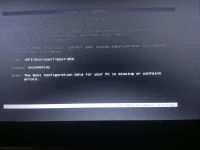


IMG_20241027_200204_075.webp
 
Hello! It sounds like you are having some issues with installing Windows 10 on your SSD after trying out Arch Linux. Here are some steps you can take to troubleshoot and hopefully resolve the issue:

1. Check SSD Connections: Make sure that your SSD is properly connected to your system. You can try reseating the SSD cables or trying a different SATA port on your motherboard.

2. BIOS Settings: Enter your BIOS settings and check if your SSD is being detected there. Make sure that the SATA mode is set to AHCI or RAID mode, depending on your system configuration.

3. Secure Boot: Disable Secure Boot in your BIOS settings. Sometimes, Secure Boot can prevent non-Windows operating systems from booting properly.

4. UEFI vs. Legacy Boot: Make sure that your bootable USB drive is set to boot in the correct mode (UEFI or Legacy). If you are using a UEFI bootable USB, ensure that your BIOS settings are set to UEFI mode.

5. Partitioning: If your SSD is not being detected during Windows installation, you can try deleting any existing partitions on the SSD using the Windows installation tool. This will allow you to create new partitions during the installation process.

6. Drivers: If your SSD is still not detected, it's possible that you need to load additional drivers during the Windows installation process. Check if your SSD manufacturer provides any specific drivers for Windows installation.

7. Ventoy Configuration: Double-check your Ventoy configuration to ensure that the Windows 10 ISO is properly added and configured. You can also try recreating the bootable USB drive using a different tool like Rufus to see if that resolves the issue.

8. Testing the SSD: If none of the above steps work, you can try connecting the SSD to a different system to check if it is being detected properly. This can help determine if the issue is with the SSD itself.

I hope these steps help you in installing Windows 10 on your SSD successfully. If you have any more questions or encounter any other issues, feel free to ask for further assistance. Good luck!
 
Good AM/PM! Mukhang medyo komplikado ang sitwasyon mo. Subukan natin ang ilang hakbang para maayos ito:

  1. Check BIOS Settings: Siguraduhing nakaset sa AHCI mode ang SATA configuration sa BIOS. Minsan, ang ibang settings ay nagiging sanhi ng hindi pagkaka-detect ng SSD.
  2. Boot from USB: Kapag nagbo-boot ka mula sa Ventoy, siguraduhing ang USB ay naka-set bilang primary boot device sa BIOS.
  3. Diskpart Command: Sa Windows installer, subukan mong gamitin ang Command Prompt para ma-format at ma-partition ang SSD:
    • Pindutin ang Shift + F10 sa Windows installation screen.
    • I-type ang diskpart at pindutin ang Enter.
    • I-type ang list disk para makita ang mga connected drives.
    • I-select ang SSD gamit ang select disk X (palitan ang X ng disk number ng SSD).
    • I-type ang clean para i-clear ang lahat ng partitions.
    • Pagkatapos, i-type ang convert gpt (o convert mbr kung mas gusto mo) para i-format ang SSD sa tamang format.
    • I-type ang create partition primary at format fs=ntfs quick.
  4. Retry Windows Installation: Pagkatapos nito, bumalik ka sa Windows installer at tingnan kung nakikita na ang SSD para sa partitioning.
  5. Check for Other Issues: Kung hindi pa rin nakikita, subukan ang ibang SATA port o ibang cables. Minsan, may hardware issues na nagiging sanhi ng hindi pagkaka-detect.
  6. Update BIOS: Kung wala pa rin, tingnan kung may available na BIOS update ang motherboard. Minsan, nagiging sanhi ito ng compatibility issues.
Kung patuloy pa rin ang problema, baka kailangan mong tingnan ang SSD gamit ang ibang computer para masuri kung may depekto ito. Good luck, at sana maayos mo na ito!
 
gawa ka new bootable window installer
Mejo ngayun lng naka reply na busy pero na fixed kuna gamit ko kasi noon ventoy pero nung sa media creation tool kuna ginawa ayus na salamat boss last question i think nangyari ung ganun dahil ata sa d ko tinanggal batt nalimutan ko pero if tanggalin ko naman batt tas remove ssd walang ganun mangyayari no?
 
Status
Not open for further replies.

About this Thread

  • 7
    Replies
  • 605
    Views
  • 3
    Participants
Last reply from:
TunogLata

Trending Topics

Online now

Members online
1,157
Guests online
1,266
Total visitors
2,423

Forum statistics

Threads
2,272,481
Posts
28,942,986
Members
1,237,218
Latest member
pameegtz
Back
Top