 PH
PH-
Welcome to PHCorner Forums! Sign up for free to unlock full access and exclusive privileges, including:
- Asking questions about computer and mobile issues
- Discovering internet tips for your mobile network and computer
You are using an out of date browser. It may not display this or other websites correctly.
You should upgrade or use an alternative browser.
You should upgrade or use an alternative browser.
🔒 Closed No out going call and txt kht may load
- Thread starter tnt user
- Start date
- Status
- Not open for further replies.
tq s pkikiramay boss,,,pero nkakatangap p ko ng incoming call and txt
ano po kaya pwd gawin dto para maais ulit?
Condolence
ano po kaya pwd gawin dto para maais ulit?
tq s pkikiramay boss,,,pero nkakatangap p ko ng incoming call and txt
LG K5 po bossAnung model ng phone mu boss?
natry ko n din po mam,,hard reset at factory reset kaya lng ganun pa dintry mo reset phone mo
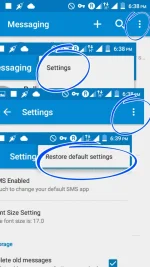
ok boss subukan ko po ngaunPunta ka sa setting ng sms mu boss tapus hanapin mu (restore default )
Ganon din po sa call setting.View attachment 98640
bos
boss,,ganun p dinPunta ka sa setting ng sms mu boss tapus hanapin mu (restore default )
Ganon din po sa call setting.View attachment 98640
Ok po boss subukan mu din po ito boss
Your mobile phone is set to connect to 3G networks only
If your mobile phone is set to connect to 3G networks only, it can't find a network if you're in an area with poor or no 3G network coverage.
What you need to do
Change network mode allowing your mobile phone to connect to both 2G and 3G networks.
Find "Network mode"
Slide your finger down the display starting from the top edge of your mobile phone.
Tap the settings icon.
Tap Networks.
Tap Tethering & networks.
Tap Mobile networks.
Tap Network mode.
Select network mode
Tap GSM/WCDMA/LTE auto, GSM/WCDMA auto, WCDMA only or GSM only.
Return to the home screen
Tapus restart mu cp mu boss ..
Charge muna aku boss babalik aku.. low bat na kasi.
Your mobile phone is set to connect to 3G networks only
If your mobile phone is set to connect to 3G networks only, it can't find a network if you're in an area with poor or no 3G network coverage.
What you need to do
Change network mode allowing your mobile phone to connect to both 2G and 3G networks.
Find "Network mode"
Slide your finger down the display starting from the top edge of your mobile phone.
Tap the settings icon.
Tap Networks.
Tap Tethering & networks.
Tap Mobile networks.
Tap Network mode.
Select network mode
Tap GSM/WCDMA/LTE auto, GSM/WCDMA auto, WCDMA only or GSM only.
Return to the home screen
Tapus restart mu cp mu boss ..
Charge muna aku boss babalik aku.. low bat na kasi.
ok boss, try ko ulitOk po boss subukan mu din po ito boss
Your mobile phone is set to connect to 3G networks only
If your mobile phone is set to connect to 3G networks only, it can't find a network if you're in an area with poor or no 3G network coverage.
What you need to do
Change network mode allowing your mobile phone to connect to both 2G and 3G networks.
Find "Network mode"
Slide your finger down the display starting from the top edge of your mobile phone.
Tap the settings icon.
Tap Networks.
Tap Tethering & networks.
Tap Mobile networks.
Tap Network mode.
Select network mode
Tap GSM/WCDMA/LTE auto, GSM/WCDMA auto, WCDMA only or GSM only.
Return to the home screen
Tapus restart mu cp mu boss ..
Charge muna aku boss babalik aku.. low bat na kasi.
boss alin po dto
mobile network settings
data roaming
preffered networks
preferred network type(2G/3G,auto)
access point names
network operators
Attachments
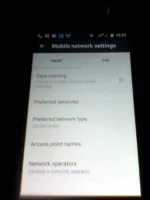

ok n po boss,,nakapgtxt n ulit ako dto ko sya binago s code n to,,*#*#4636#*#* then hinanap ko ung settings GSM/CDMA/LTE auto,,,tq po ulit at maraming salamat po s lht ng nag reply s post ko,,tq po ulit lht s inyoOk po boss subukan mu din po ito boss
Your mobile phone is set to connect to 3G networks only
If your mobile phone is set to connect to 3G networks only, it can't find a network if you're in an area with poor or no 3G network coverage.
What you need to do
Change network mode allowing your mobile phone to connect to both 2G and 3G networks.
Find "Network mode"
Slide your finger down the display starting from the top edge of your mobile phone.
Tap the settings icon.
Tap Networks.
Tap Tethering & networks.
Tap Mobile networks.
Tap Network mode.
Select network mode
Tap GSM/WCDMA/LTE auto, GSM/WCDMA auto, WCDMA only or GSM only.
Return to the home screen
Tapus restart mu cp mu boss ..
Charge muna aku boss babalik aku.. low bat na kasi.
- Status
- Not open for further replies.
About this Thread
-
10Replies
-
886Views
-
4Participants
Last reply from:
tnt user
tnt user
New Topics
-
Lcd Samsung galaxy flip 4 repair cost
- Started by AmehGoOoO
- Replies: 0
- ❓ Mobile Discussion & Support
-
SONGHUB IDX REPACKER v1.3.0 (MIDI/KAR -> IDX)
- Started by yaniinuuu
- Replies: 2
- ❓ Mobile Discussion & Support
-
Rog 9 pro issue
- Started by HitSoHard
- Replies: 0
- ❓ Mobile Discussion & Support
-
Help for infinix smart 8 X6525
- Started by The BGE
- Replies: 0
- ❓ Mobile Discussion & Support
-
SONGHUB REPACKER (MIDI/KAR -> IDX)
- Started by yaniinuuu
- Replies: 22
- ❓ Mobile Discussion & Support
-
Fairphone in PH?
- Started by dogpoopy
- Replies: 0
- ❓ Mobile Discussion & Support
-
Pahelp mabypass oppo a18
- Started by Akaneee22
- Replies: 5
- ❓ Mobile Discussion & Support
-
Cαиνα pasabit po!
- Started by saiiirus16
- Replies: 0
- ❓ Mobile Discussion & Support
-
Pasabit naman Cánvá ρrø Salamat
- Started by Dontreachyoungbloood
- Replies: 1
- ❓ Mobile Discussion & Support
-
Gcash Crashing on Pixel 9 Pro
- Started by cyqualia
- Replies: 8
- ❓ Mobile Discussion & Support
Trending Topics
Online now
- Members online
- 1,249
- Guests online
- 7,678
- Total visitors
- 8,927