❓ Help Smart Unli data 599 Throttled na rin ba yung download speed niyo?

nhile101

Fanatic
Good Day!
While downloading movies here with directlink to Mediafire..
Napansin ko bakit sobrang bagal ni Mediafire mag DL. Of all hosting isa ang Mediafire with the DL speed. Though busy ako, hindi ko masyadong pinansin so hinayaan ko nalang, thinking IT will speed Up anytime..

Now I tried again, with other hosting sites, lahat sila halos around 350 kB/s lang

I checked Speedtest and speed looks good, always getting around 100 mB/s

Tapos nag double check with both Fast and Google speedtest.. then BOOOOM! Tinamaan ng lintik.
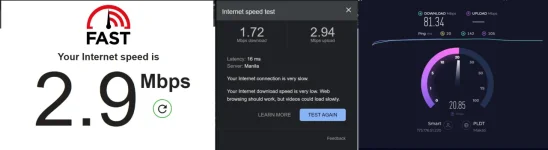
1729511144531.webp
 
Hello! It seems like you're experiencing slow download speeds when downloading from Mediafire and other hosting sites despite having a good speed on your Speedtest. This can be frustrating, but there are a few possible reasons and solutions you can consider:

1. Server Congestion: Mediafire and other hosting sites may experience high traffic or server congestion, leading to slower download speeds for their users. Unfortunately, this is beyond your control and can only be resolved by the hosting provider.

2. Throttling: Some ISPs implement throttling on certain websites or services, which can result in slower speeds when accessing specific content. This could be a reason for the slow speeds on Mediafire. You can contact your ISP to inquire about this and see if they can provide any solutions.

3. VPN Usage: If you're using a VPN, it can sometimes impact your download speeds. Try disabling the VPN temporarily to see if it improves your download speeds.

4. Browser Extensions: Certain browser extensions or plugins can also affect download speeds. Try downloading from an incognito/private browsing window without any extensions enabled to see if there's any improvement.

5. Network Configuration: Check your network configuration and ensure that there are no issues with your router, firewall settings, or any other network-related issues that could be affecting your download speeds.

6. Contacting Hosting Provider: If the issue persists, you can reach out to Mediafire's support team to inquire about the slow download speeds and see if they can provide any assistance or explanation.

It's essential to troubleshoot these potential causes to identify the root of the problem and find a suitable solution. If none of these steps help, it might be worth seeking assistance from both your ISP and the hosting provider to address the slow download speeds you're experiencing.
 

About this Thread

  • 2
    Replies
  • 646
    Views
  • 2
    Participants
Last reply from:
plhbg1

Trending Topics

Online now

Members online
1,107
Guests online
1,339
Total visitors
2,446

Forum statistics

Threads
2,273,418
Posts
28,949,369
Members
1,235,741
Latest member
qwertyuuiop
Back
Top