 PH
PHEproxy Default Apn with Open Ssh
1.Create your Own ssh Account.
2.Download the Epro file.
3.Download Eproxy app on Playstore
4.Open the file in the Eproxy App and configure your Ssh account.
5.Connect Using Default Apn
The Speed depends on:
1.Location
2.Server used (ex. Singapore, US, Japan)
3.Mobile data 3G or 4G
In my case, I used:
1.4G connection
2.Singapore server
3.My location is Region 3
And my Speed is 11.6Mbps as of 2:30pm, Nov 19.
Yan mga Ka PHC, sana mgenjoy kayo sa bagong Config at sana natulungan ko kayo sa mga nahihirapan mkaconnect at magkaroon ng Free Internet.
Simpleng LIKE lang masaya nako guys
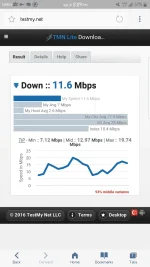 View attachment 98287
1.Create your Own ssh Account.
2.Download the Epro file.
3.Download Eproxy app on Playstore
4.Open the file in the Eproxy App and configure your Ssh account.
5.Connect Using Default Apn
The Speed depends on:
1.Location
2.Server used (ex. Singapore, US, Japan)
3.Mobile data 3G or 4G
In my case, I used:
1.4G connection
2.Singapore server
3.My location is Region 3
And my Speed is 11.6Mbps as of 2:30pm, Nov 19.
Yan mga Ka PHC, sana mgenjoy kayo sa bagong Config at sana natulungan ko kayo sa mga nahihirapan mkaconnect at magkaroon ng Free Internet.
Simpleng LIKE lang masaya nako guys
View attachment 98287