PH
PHFirst- install muna kayo "Termux" meron dito sa phc post pagkakaalala ko search nyo nalang.
Second- update nyo muna package ng termux app nyo paste nyo to sa termux
Code:
pkg update && pkg upgradeThird- install python paste nyo to
Code:
pkg install pythonFourth- install pip paste nyo ito
Code:
pkg install python-pipFifth- install libraries paste this
Code:
pip install requestsSix- create kayo directory para sa python ninyo paste
Code:
mkdir python_scripts
cd python_scriptsSeven- Create kayo python file paste this
Code:
nano registration_checker.pythen paste nyo itong script:
Code:
import requests
import json
import time
from datetime import datetime

# Configuration
API_URL = "https://hotel101app.com/api/app-version"
TELEGRAM_BOT_TOKEN = "YOUR_BOT_TOKEN_HERE"
TELEGRAM_CHAT_ID = "YOUR_CHAT_ID_HERE"
CHECK_INTERVAL = 20  # Check every 20 seconds
NOTIFICATION_INTERVAL = 20  # Send notification every 20 seconds when up

def get_app_version():
    headers = {
        'User-Agent': 'Mozilla/5.0 (Windows NT 10.0; Win64; x64) AppleWebKit/537.36 (KHTML, like Gecko) Chrome/91.0.4472.124 Safari/537.36',
        'Accept': 'application/json, text/plain, */*',
        'Accept-Language': 'en-US,en;q=0.9',
        'Referer': 'https://hotel101app.com/',
        'Origin': 'https://hotel101app.com'
    }

    try:
        response = requests.get(API_URL, headers=headers)
        if response.status_code == 200:
            return response.json()
        else:
            print(f"Failed to retrieve data. Status code: {response.status_code}")
            return None
    except requests.RequestException as e:
        print(f"An error occurred: {e}")
        return None

def send_telegram_message(message):
    url = f"https://api.telegram.org/bot{TELEGRAM_BOT_TOKEN}/sendMessage"
    payload = {
        "chat_id": TELEGRAM_CHAT_ID,
        "text": message
    }
    try:
        response = requests.post(url, json=payload)
        print(f"Telegram API response: {response.status_code}")
        return response.status_code == 200
    except Exception as e:
        print(f"Error sending Telegram message: {e}")
        return False

def main():
    last_status = None
    last_notification_time = 0
    down_notified = False

    while True:
        data = get_app_version()
        if data:
            current_status = data.get("disable_signup")
            current_time = datetime.now().strftime("%Y-%m-%d %H:%M:%S")
            current_timestamp = time.time()

            if current_status == 0:  # Hotel101 is up
                if current_timestamp - last_notification_time >= NOTIFICATION_INTERVAL:
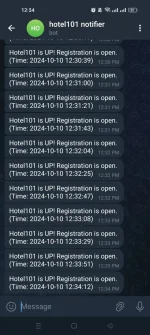
                    message = f"Hotel101 is UP! Registration is open. (Time: {current_time})"
                    if send_telegram_message(message):
                        print(f"Notification sent: {message}")
                    last_notification_time = current_timestamp
                down_notified = False
            elif current_status == 1 and not down_notified:  # Hotel101 is down
                message = f"Hotel101 is now DOWN. Registration is closed. (Time: {current_time})"
                if send_telegram_message(message):
                    print(f"Notification sent: {message}")
                down_notified = True

            last_status = current_status

        time.sleep(CHECK_INTERVAL)

if __name__ == "__main__":
    main()
note: palitan nyo po yung telegram_bot_token at chat id nyo bago kayo mag proceed sa next step.
after nyo mapalitang yung token at chat id nyo
save it( in nano, press CTRL+X , then Y for yes and hit enter )
eight- run nyo na yung python script. paste this
Code:
python registration_checker.py
Code:
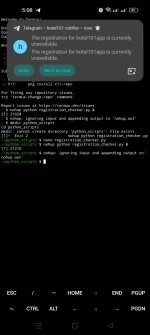
nohup python registration_checker.py &kung gusto nyo naman i stop pag run ng script sa background just open settings . application . find termux app. then force close.
now san makukuha telegram bot token and chat ID nyo?
1. Set Up Your Bot on Telegram:
- Open Telegram and search for the “BotFather.”
- Start a chat with BotFather and use the command
/newbot to create a new bot.- Follow the prompts to choose a name and username for your bot.
- Once created, you’ll receive a token. Keep this token safe; you'll need it for our script.
para sa chat id paste nyo ito sa browser You do not have permission to view the full content of this post. Log in or register now. then enter
. after mag loading di nyo pa makikita chat id nyo jan, balikan nyo yung telegram bot na ginawa nyo then mag chat kayo kahit ano sample /test the enter . after nun balik na kayo sa browser kung then refresh the browser . makikita nyo na chat id ng telegram nyo.
comment lang po kung may mga katanungan pa.
note: magkasama po ito pag cnopy at paste nyo sa termux.
Code:
mkdir python_scripts
cd python_scripts
Spoiler contents are visible only to Established Members.
working na po . updated na po yung script pa check yung bago.