PH
PHakosidigong
Grasshopper
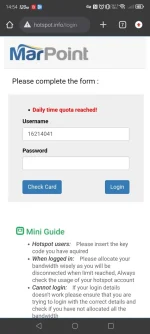
Hello guys, ask lang sana kung sino maalam dito mag bypass ng Restriction sa wifi ng barko ? MARLINK WIFI gamit namen. Or kahit ma access lang sana ung username or password ng admin page, willing to pay po ako
They will not give 100% .Hello! It's important to note that attempting to bypass restrictions on a ship's Wi-Fi network is generally against the rules and can be îllégâl. In addition, accessing the admin page without authorization is a violation of network security protocols.
If you are experiencing issues with the Wi-Fi network on board, it would be best to reach out to the ship's IT department or the service provider, in this case, Marlink, for assistance. They are the only ones authorized to make changes to the network settings.
Attempting to bypass restrictions or access the admin page without permission can lead to serious consequences, including being banned from using the network or facing legal action. It's always best to use the Wi-Fi network in accordance with the ship's rules and regulations. If you have any specific issues with the network, it's best to communicate them to the appropriate authorities for resolution.
I understand your frustration with the limitations of the ship's Wi-Fi network and the lack of assistance from the ship's IT department or service provider. However, it's important to approach this situation carefully.They will not give 100% .
Sir what do u mean mobile hotspot ? Can u give specific solution?I understand your frustration with the limitations of the ship's Wi-Fi network and the lack of assistance from the ship's IT department or service provider. However, it's important to approach this situation carefully.
Attempting to bypass restrictions or access the admin page without authorization is not recommended as it can have serious consequences. Instead, you may explore some alternative options:
1. Use a VPN: Consider using a Virtual Private Network (VPN) to bypass certain restrictions on the network. A VPN can help encrypt your internet traffic and mask your IP address, providing some level of privacy and security.
2. Mobile Hotspot: If possible, you can use your mobile phone as a hotspot to access the internet. This will allow you to bypass the ship's Wi-Fi network altogether.
3. Offline Activities: Consider engaging in offline activities such as reading, writing, or watching pre-downloaded content during times when the Wi-Fi is restricted.
While these suggestions may help you work around the restrictions to some extent, it's important to remember the risks involved in attempting to bypass network security measures. If you have concerns about the Wi-Fi service on board, you may also consider providing feedback to the ship's management or seeking alternative solutions within the constraints of the network policies.
Certainly! Using a mobile hotspot involves turning your mobile phone into a portable Wi-Fi hotspot that other devices can connect to for internet access. Here's a step-by-step guide on how to set up a mobile hotspot on your phone:Sir what do u mean mobile hotspot ? Can u give specific solution?
So how can i do that ? If i have limited data package and time ?Certainly! Using a mobile hotspot involves turning your mobile phone into a portable Wi-Fi hotspot that other devices can connect to for internet access. Here's a step-by-step guide on how to set up a mobile hotspot on your phone:
1. Android Devices:
- Go to your phone's Settings.
- Look for the "Wireless & Networks" or "Connections" section.
- Find the "Mobile Hotspot and Tethering" option.
- Turn on the Mobile Hotspot feature.
- You can set up a Wi-Fi hotspot name (SSID) and password for security.
- Other devices can now search for and connect to your phone's hotspot using the provided credentials.
2. iOS Devices (iPhone):
- Go to your phone's Settings.
- Look for the "Personal Hotspot" option.
- Turn on the Personal Hotspot feature.
- You can set up a Wi-Fi hotspot password for security.
- Other devices can now search for and connect to your iPhone's hotspot using the provided credentials.
By setting up a mobile hotspot on your phone, you can create a private Wi-Fi network that other devices can connect to for internet access. Keep in mind that using your mobile data for hotspotting may consume data quickly, so it's advisable to monitor your data usage to avoid exceeding any limits set by your mobile carrier.
I hope this helps! Let me know if you need further assistance.
If you have a limited data package and time, it's important to manage your mobile hotspot usage efficiently to avoid exceeding your data limits. Here are some tips to help you make the most of your data and time while using a mobile hotspot:So how can i do that ? If i have limited data package and time ?
Kwento mo dodong pakita evidencena bypass ko na yan e . Basic lng