❓ Help Wifi connection

pphhpp8253

Eternal Poster
Hello mga lodipapz hingi Ako sana opinion o tulong..


Plan ko Kasi mag pa rent ng wifi connection namin since madami pang walang wifi malapit samin, gusto ko sanang per head Yung rent..

Concern kolang e diba pweding eshare Yung wifi password gamit ang qr code correct me if I'm wrong.. at pwede kading magdownload ng wifi password sa play store kahit di rooted phone pwede mo Makita Yung password pag nakakonek kana..

Yung Tanong ko pwede bang erestrict Yung pagshare ng wifi password?

Or any suggestion mga lodipapz ano magandang Gawin?

TIA
 
Hello! I understand your concern about renting out your WiFi connection on a per head basis and the potential security issues that may arise from sharing the password. Let me address your questions and provide some suggestions:

1. Sharing WiFi Password via QR Code: Yes, it is possible to share your WiFi password using a QR code for easy access. This can be done by generating a QR code containing the network credentials and allowing others to scan it to connect to the WiFi network. However, this method may not be the most secure as the QR code can be easily shared with others.

2. Viewing WiFi Password on Android Devices: While it is true that some Android apps claim to show WiFi passwords on non-rooted devices, it's important to note that such apps may pose security risks and are not recommended. Revealing WiFi passwords in this manner can lead to unauthorized access by individuals who are not supposed to have network access.

3. Restricting WiFi Password Sharing: Unfortunately, most consumer-grade routers do not have built-in features to restrict the sharing of WiFi passwords. One way to manage this is by periodically changing the network password and only sharing it with authorized users. You can also consider setting up a guest network with limited access for those who are renting the connection.

4. Suggestions:
- Consider setting up a separate guest network with limited bandwidth and access restrictions for those renting the connection.
- Regularly change the network password and provide it only to authorized users.
- Monitor the network usage to ensure that it is not being abused or shared beyond the agreed terms.
- Have a written agreement or contract outlining the terms and conditions of renting the WiFi connection to protect yourself legally.

Overall, it's important to strike a balance between providing a service and ensuring the security and integrity of your network. If you have further questions or need more assistance, feel free to ask!
 
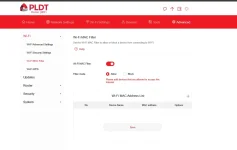
pwede din mac filtering
pwede yun basta naka default mac yung mga gagamit hindi random mac
Ito ngayon yung nasaisip ko mga lodipapz

Kung si "A" nagrent ng wifi sakin tapos nishare niya yung net niya kay "B" yung gagawin ko ibablock ko nalang yung mac ni B? tapos pagnaisipan ni B na magrent narin ng wifi tatanggalin ko siya sa blacklisted tapos ok nayun? Hirap talaga maghanap ng pera.. hays.. 😅
 
Pwede naman allowed list nalang para no need mag block, need mo lang yung mac address ni A tapos siya lang makaka connect, kapag nag try si B mag connect, hindi mag coconnect

1727931603898.webp
 
Ayun! Mas maganda.. hehehe sa ganitong systema lodipapz need kopabang mag create ng guest network para dun magkonek yung mga magrerent? Di ba hihina net nila pag sa guest network lang?
Ang alam ko wala naman difference sa speed kapag guest wifi or yung main wifi. Ang problema mo lang dyan kapag malakas mag download yung isang user, affected lahat kasi hindi mo ma control yung speed nila.

Mas better padin kapag may router ka na meron ganyan na feature.
 
Ang alam ko wala naman difference sa speed kapag guest wifi or yung main wifi. Ang problema mo lang dyan kapag malakas mag download yung isang user, affected lahat kasi hindi mo ma control yung speed nila.

Mas better padin kapag may router ka na meron ganyan na feature.
Ahh.. parang meron atang option yan na pweding mong iset kung ilan yung speed ng dl/ul ng guest? Parang nabasa ko sa net kahapon or specific device lang merong ganyan.. bumili kasi ako ng bagonh pldt h155 832.. dikoba nagalaw sana merong feature dun..
 
Ahh.. parang meron atang option yan na pweding mong iset kung ilan yung speed ng dl/ul ng guest? Parang nabasa ko sa net kahapon or specific device lang merong ganyan.. bumili kasi ako ng bagonh pldt h155 832.. dikoba nagalaw sana merong feature dun..
wala siya ganun, h155 gamit ko ngayon
 
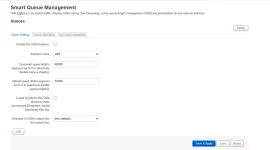
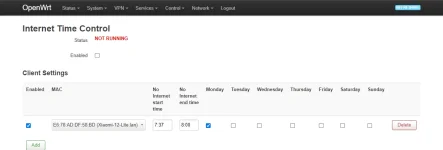
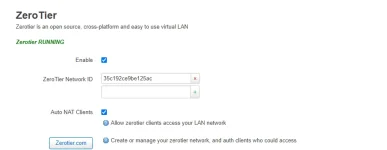
kaya need talaga openwrt yung may sqm at internet time control, tapos zerotier para kahit wala ka sa bahay pwede mo check yung router mo anytime
Ang alam ko wala naman difference sa speed kapag guest wifi or yung main wifi. Ang problema mo lang dyan kapag malakas mag download yung isang user, affected lahat kasi hindi mo ma control yung speed nila.

Mas better padin kapag may router ka na meron ganyan na feature.
1727932999161.webp

1727933027467.webp

1727933067201.webp
 

About this Thread

  • 27
    Replies
  • 2K
    Views
  • 7
    Participants
Last reply from:
PHC - Freenet

Trending Topics

Online now

Members online
363
Guests online
6,187
Total visitors
6,550

Forum statistics

Threads
2,271,155
Posts
28,939,806
Members
1,240,211
Latest member
Frostydandelion
Back
Top