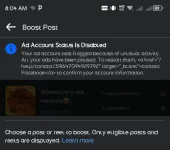
When your ad account is disabled on Facebook due to unusual activity, it typically means that Facebook's automated systems have detected something out of the ordinary in your account's behavior. This can happen for a variety of reasons, such as violating Facebook's advertising policies, using inappropriate content, or engaging in suspicious activities like click fraud.
To address this issue and potentially get your ad account reinstated, you can follow these steps:
1. Review Facebook's Advertising Policies: Take the time to carefully read through Facebook's Advertising Policies to understand what might have led to your account being disabled. Make sure that your ads comply with these guidelines.
2. Contact Facebook Support: You can try reaching out to Facebook's support team through the Facebook Business Help Center. Explain your situation and inquire about the specific reason for the ad account disablement.
3. Appeal the Decision: If you believe that your ad account was disabled in error or if you have made necessary changes to comply with Facebook's policies, you can submit an appeal through the Business Help Center. Provide any relevant information or documentation that supports your case.
4. Verify Your Account: Facebook may ask you to verify your identity or confirm your billing information to help resolve the issue. Make sure to follow any instructions provided by Facebook to complete this verification process.
5. Be Patient: Resolving ad account issues with Facebook can sometimes take time. Stay patient and continue to follow up with Facebook support if necessary.
Remember to always adhere to Facebook's policies and guidelines to prevent future issues with your ad account. If you're still facing difficulties, consider seeking assistance from a digital marketing professional or agency with experience in Facebook advertising compliance.
 PH
PH