PH
PH │VivaCut - Pro Video Editor
  v3.8.8
  Requirements: Android 7.0 and above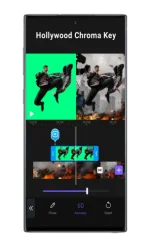
━━━━━━━━━━━━━━━━━━━
☑ | Overview

VivaCut is a premier video editing app designed for creating full-screen videos. Whether you're crafting aesthetic films or capturing and sharing fun moments with friends, VivaCut equips you with all the tools needed for professional video editing.
☑ | Key Features
- Professional Video Editing: Mix and combine videos like a Hollywood director with top-notch chroma key capabilities and background changing tools.
- Creative Elements: Enhance your videos with masks, collages, text, stickers, and emojis.
- Dynamic Effects: Tailor scenes with various shapes, including linear, mirror, radial, rectangle, and oval, perfect for YouTube content.
- Rhythm Marking: Sync effects to the rhythm of your music for an engaging experience.
- Aesthetic Transitions: Utilize transition effects and extract audio from videos for a polished finish.
- Intuitive Interface: Enjoy frame-by-frame precision with an overlay video editor.
- Custom Styles: Edit, duplicate, and modify styles with diverse fonts, emojis, colors, and effects.
- Cinematic Overlays: Create stunning videos with cinematic overlays and transition effects.
- Quality Control: Adjust brightness, contrast, saturation, hue, and more to enhance video quality.
- Versatile Editing: Split videos, merge clips, and create smooth transitions with ease. Achieve fast and slow-motion effects like a pro.
- Combine Clips: Create eye-catching double exposures and engaging YouTube videos with seamless transitions.
- Layer Customization: Edit layers with opacity and blending tools for creative effects.
- Powerful Blending Modes: Experiment with modes like Color Burn, Multiply, and Soft Light for unique visuals.
- Storytelling: Use pictures and music to narrate your story effectively.
- Export Options: Save videos in 720p, 1080p, and 4K resolutions.
- Direct Sharing: Easily share your creations on platforms like YouTube, Instagram, TikTok, and Snapchat.
☑ | What's New
1. A completely redesigned editing user interface.
2. Language options now available in settings.
You do not have permission to view the full content of this post.
Log in or register now.