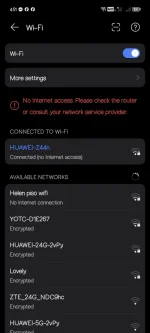
Hello! I'm sorry to hear about your internet connection issues. Here are a few steps you can try to troubleshoot the problem:
1. Check your data balance: Make sure that the data you loaded actually went through and is reflected in your account balance. You can usually do this by texting a specific code provided by your service provider.
2. Restart your device: Sometimes a simple restart can fix connectivity issues. Turn off your device, wait a few seconds, and then turn it back on.
3. Check for network coverage: Ensure that you are in an area with good network coverage. Sometimes, moving to a different location can help improve your signal.
4. Check your APN settings: Make sure that your Access Point Name (APN) settings are correct. You can usually find these settings in your device's network or cellular settings.
5. Contact your service provider: If none of the above steps work, it's best to contact your service provider's customer service for further assistance. They may be able to troubleshoot remotely or provide more specific guidance based on your situation.
I hope these suggestions help you get your internet connection back up and running soon so you can resume your work.
 PH
PH