 PH
PH-
Welcome to PHCorner Forums! Sign up for free to unlock full access and exclusive privileges, including:
- Asking questions about computer and mobile issues
- Discovering internet tips for your mobile network and computer
You are using an out of date browser. It may not display this or other websites correctly.
You should upgrade or use an alternative browser.
You should upgrade or use an alternative browser.
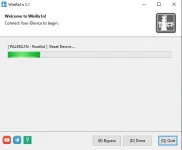
❓ Help By@ss pahelp namn po hindi po umaalis dito iphone 6s plus ios 15 di ko po ma jailbreak
🤖
🤖
I understand that you are having difficulty jailbreaking your iPhone 6s Plus running on iOS 15. Jailbreaking can sometimes be challenging, especially with newer iOS versions. Here are a few steps you can try to troubleshoot the issue:hindi po ma jailbreak
1. Check Compatibility: Make sure that the jailbreak tool you are using is compatible with iOS 15 and your specific iPhone model (iPhone 6s Plus).
2. Update Jailbreak Tool: If the jailbreak tool you are using is outdated, try updating it to the latest version that supports iOS 15.
3. Restart Your Device: Sometimes, a simple restart can resolve temporary issues. Turn off your iPhone and then turn it back on to see if that helps.
4. Disable Find My iPhone: If Find My iPhone is enabled on your device, try disabling it before attempting to jailbreak. Go to Settings > [Your Name] > Find My > Find My iPhone and turn it off.
5. Reset Settings: You can try resetting all settings on your iPhone by going to Settings > General > Reset > Reset All Settings. This will not erase your data but will reset all settings to default.
6. Use a Different Jailbreak Tool: If the current jailbreak tool is not working, you can try using a different tool that is known to be compatible with iOS 15.
7. Seek Professional Help: If you are still unable to jailbreak your device, consider reaching out to a professional service or a dedicated online community/forum for further assistance.
Please proceed with caution when attempting to jailbreak your device, as it can void your warranty and potentially cause issues with your device if not done correctly. Let me know if you have any specific questions or if you need further assistance with the jailbreaking process.
About this Thread
-
3Replies
-
412Views
-
1Participants
Last reply from:
Unknown user
Unknown user
New Topics
-
UPLIFT (system suggestions at inis)
- Started by PHC-Coder
- Replies: 2
- 💬 Chitchat
-
Any owner ng Vendo Machine, like carwash and wifi?
- Started by darknight0909
- Replies: 0
- 💬 Chitchat
-
Kami po ay nasunugan
- Started by mjba4w
- Replies: 2
- 💬 Chitchat
-
Scribd Free Trial 2 download limit bypass Unli Download Bug
- Started by -NEXUS-
- Replies: 5
- 💬 Chitchat
-
RCBC acct ko, pinang scam dito galing.
- Started by ProTiTips
- Replies: 4
- 💬 Chitchat
-
Ai free video generator
- Started by labrador
- Replies: 0
- 💬 Chitchat
-
Pa claim po ako ng ᑕᕼᗩTGᑭT ko may free offer po ako
- Started by Tan342
- Replies: 6
- 💬 Chitchat
-
CC Checker lang master pabulong
- Started by Deymmm3
- Replies: 1
- 💬 Chitchat
Trending Topics
Online now
- Members online
- 1,168
- Guests online
- 4,244
- Total visitors
- 5,412