 PH
PHgarpsan312
Eternal Poster
Mga paps tanong lang yung SS IPTV pwede din po ba ang xtreme code or m3u playlist lang sya? maraming salamat po
Sige tatry ko sya later! Update ako kung gumana syaTS, given na ganito ang xtreme code mo:
https ://example.com:8080/
user = Jando
password = Jendo
Try mo ganitong format ang i-type sa URL box ni SS IPTV, walang space:
https ://example.com:8080/get.php?username:Jando&password=Jendo&type=m3u
Ano update paps? SS IPTV lang din kasi meron sa Smart TV namin.Sige tatry ko sya later! Update ako kung gumana sya
working sya papsAno update paps? SS IPTV lang din kasi meron sa Smart TV namin.
paps working sya maraming salamatTS, given na ganito ang xtreme code mo:
https ://example.com:8080/
user = Jando
password = Jendo
Try mo ganitong format ang i-type sa URL box ni SS IPTV, walang space:
https ://example.com:8080/get.php?username:Jando&password=Jendo&type=m3u
Walang anuman, TS.working sya paps
https ://example.com:8080/get.php?username=Jando&password=Jendo&type=m3u
dapat ganito yung ilalagay mo sa ss iptv
paps working sya maraming salamat
Thank you paps!Walang anuman, TS.
[Hidden content]
TS, given na ganito ang xtreme code mo:
https ://example.com:8080/
user = Jando
password = Jendo
Try mo ganitong format ang i-type sa URL box ni SS IPTV, walang space:
https ://example.com:8080/get.php?username:Jando&password=Jendo&type=m3u
salamat dito papsWalang anuman, TS.
[Hidden content]
Thank you paps!
Ayun! Galing! Thank you paps! Akala ko for m3u lang tong SS IPTV. Hirap pa naman hanapan ng mga working na source.
Walang anuman. Enjoy!salamat dito paps
Salamat lodiDalawa ang paraan sa paglalagay ng iptv link sa SS IPTV:
1. Via SS IPTV Playlist Editor:
Buksan ang tv, start SS IPTV, Click on Settings > sa General tab, click on Get code > kopyahin yung code na lumabas.
Sa computer, start mo yung gamit mong browser, punta ka sa You do not have permission to view the full content of this post. Log in or register now. > i-type yung code sa Enter connection code box, tapos click mo yung Download button >
1.a. Kung local playlist ang source mo (ibig sabihin, nasa computer yung playlist file, m3u), click on My Playlist tab , click mo yung Open button tapos i-browse mo sa computer yung location nung local playlist mo > click on Download at hintaying matapos ang downloading > click on Save button.
1.b. Kung external link ang source, click mo yung External Playlist tab > fill-upan mo yung lalabas na dialog box, tapos click on Save.
Sa tv, balik ka sa Main screen tapos click mo yung circular arrows para ma-refresh mo si SS IPTV, lalabas na yung in-upload mong playlist.
2. Via SS IPTV app:
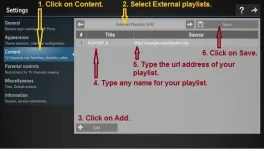
Start SS IPTV, click on Settings > click on Content > sundin yung steps 1 - 6 sa picture:
View attachment 3259581
Walang anuman, paps. Enjoy!Salamat lodi