 PH
PHNguyenVanThong
Honorary Poster
Windows 11 Pro Lite/SuperLite/Compact v23H2 Build 22631.4169 by Ghost Spectre
ScreenShot

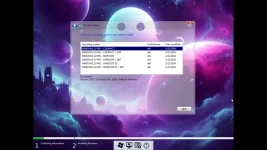
Windows 11 release information
- OS build : 22631.4169
- Edition : PRO SUPERLITE + SE + COMPACT + DEFENDER + W/O DEFENDER
- Version : 23H2 (Official Release)
- Arch : x64
- Lang : en-US
FEATURES
– Improve DirectX12– Compact Integrated + LZX (algorithm)
– Bloatware FREE!!
– Optimized Pagefile/Services/Scheduled/Search Indexer
– Privacy Optimizations & Performante mode!
– Ghost Toolbox! (Add or Remove Windows Store and Much More!)
– Support any Other Language & Keyboard
– Support UWP Games / UWP Apps (ex. Forza/GOW/etc etc)
– Updatable (can update to latest build windows 11!)
– Window update can be paused until 2077!
– With custom Icons packs / Windows Themes pack!
– GHOST CUSTOM BOOTABLE! (WPE)
– GHOST NORMAL BOOTABLE SV2
– Built-in TPM or Without TPM
REMOVE/DISABLES COMPONENT
– Removes Windows Apps and System Apps– Removes Windows Security / Defender / Smartscreen
– Disable Remote Desktop / Tablet keyboard / NFC / Clipboard / Focus Assist – (Superlite only)
– Disable Print spooler (If you need printers please set Auto in Services)
– Removes OneDrive (can get it back using ghost toolbox)
– Disable Action Center / Notifications – (Superlite only)
– Disable Telemetry – (Superlite only)
– Removes Errors reports – (Superlite only)
– Disable UAC (Never notify)
– Removes WinSxS backup
Versions when installed:
1. WINDOWS 11 PRO + COMPACT x64 — NOT a stripped-down Windows, only removal of applications/unnecessary programs – for regular users – suitable for office work, laptops, tablets, servers, etc.2. WINDOWS 11 PRO + COMPACT + DEF x64 — The same as in point 1. But Windows Defender is enabled.
3. WINDOWS 11 PRO + SUPERLITE x64 — This version is already configured – for advanced users – suitable for gaming and streaming.
4. WINDOWS 11 PRO + SUPERLITE + DEF x64 — The same as in point 3. But Windows Defender is enabled.
5. WINDOWS 11 PRO + SUPERLITE SE x64 — Same as in point 3. But the Start menu is added, like in Windows 7.
6. WINDOWS 11 PRO + SUPERLITE SE + DEF x64 — Same as in point 5. But Windows Defender is enabled.
*Start in the SUPERLITE SE version is controlled by the StartAllBack program
Download Windows 11 Pro Lite/SuperLite/Compact v23H2 Build 22631.4169 by Ghost Spectre
Download
