 PH
PHNami Raven
Honorary Poster
Hindi po ako PRO, nagexplore lang din, working saakin, sana sa inyo din
Step by Step Guide para sa yt-dlp (Windows OS only)
1. Download You do not have permission to view the full content of this post. Log in or register now.
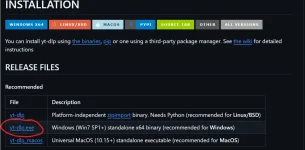
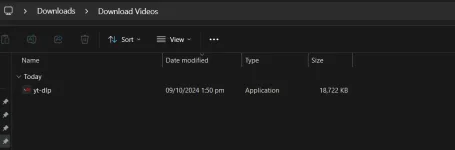
2. Save mo ang yt-dlp.exe sa Folder
3. Download ffmpeg (Para ma merge yung Audio sa Video) You do not have permission to view the full content of this post. Log in or register now.
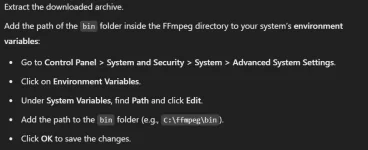
4. Follow this:
5. Open cmd dun mismo sa folder nf yt-dlp. Right Click > Open in Terminal
6. Para sa pagdownload ng individual YT Video na mp4 at 1080p type mo to (kasama yung tuldok sa unahan, at yung double qoute):
.\yt-dlp -f "bestvideo[height=1080]+bestaudio/best[height=1080]" --merge-output-format mp4 "ReplaceThisTextWithYoutubeLink"
Para naman sa Playlist na mp4 at 1080p
.\yt-dlp --yes-playlist -f "bestvideo[height=1080]+bestaudio/best[height=1080]" --merge-output-format mp4 "ReplaceThisTextWithYoutubePlaylistLink"
7. Then press enter:
Eto yung mga supported sites na pwede mo pag gamitan neto. You do not have permission to view the full content of this post. Log in or register now.
You do not have permission to view the full content of this post. Log in or register now.
Step by Step Guide para sa yt-dlp (Windows OS only)
1. Download You do not have permission to view the full content of this post. Log in or register now.
2. Save mo ang yt-dlp.exe sa Folder
3. Download ffmpeg (Para ma merge yung Audio sa Video) You do not have permission to view the full content of this post. Log in or register now.
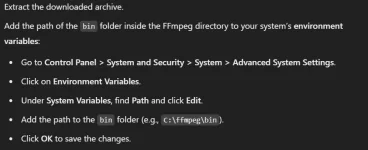
4. Follow this:
5. Open cmd dun mismo sa folder nf yt-dlp. Right Click > Open in Terminal
6. Para sa pagdownload ng individual YT Video na mp4 at 1080p type mo to (kasama yung tuldok sa unahan, at yung double qoute):
.\yt-dlp -f "bestvideo[height=1080]+bestaudio/best[height=1080]" --merge-output-format mp4 "ReplaceThisTextWithYoutubeLink"
Para naman sa Playlist na mp4 at 1080p
.\yt-dlp --yes-playlist -f "bestvideo[height=1080]+bestaudio/best[height=1080]" --merge-output-format mp4 "ReplaceThisTextWithYoutubePlaylistLink"
7. Then press enter:
Eto yung mga supported sites na pwede mo pag gamitan neto. You do not have permission to view the full content of this post. Log in or register now.
You do not have permission to view the full content of this post. Log in or register now.