🖥️ Smart TV SmartTube [Beta] [Stable]

Status
Not open for further replies.

h4lflif3

Forum Expert
Features:
  • No Ads
  • SponsorBlock
  • Adjustable playback speed
  • Designed for TV screens
  • 8k support
  • 60fps
  • HDR
  • Login into your account
  • Cast from the phone
  • Support tv box remote controller
  • Support external software keyboard
  • Read live chat
  • Customizable buttons
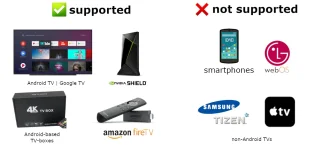
  • Support devices without Google Services


Beta Release:
  • Gets new features and bugfixes faster
You do not have permission to view the full content of this post. Log in or register now.
Stable Release:
  • Latest
You do not have permission to view the full content of this post. Log in or register now.
 
Support po
Thank you po. Working sya sa Google TV.
Thanks TS
Thanks lods. Working po sya :)
salamat idol
Welcome po mga boss.
Pang android lng ito?
Yes po.
upload_f6ab10668ea7793f099108f2b2230406.webp
anong version po neto?
Sa ngayon po,

24.71 Beta:
-Previous release bug fixes

24.71 Stable:
-Previous release fixes:
*Liked music fix
*Subtitles fix
*Channel search fix
*Empty pinned channel fix
*Playlist section sorting fix
 
panu po nyo sya iniinstall sa tv???
You can use either of the following methods to install the app:

• (easiest) install You do not have permission to view the full content of this post. Log in or register now. on your Android TV, open it and enter You do not have permission to view the full content of this post. Log in or register now. or You do not have permission to view the full content of this post. Log in or register now., then read, understand and confirm the security prompts. (You can also enter You do not have permission to view the full content of this post. Log in or register now. (for beta) or You do not have permission to view the full content of this post. Log in or register now. (for stable), but this requires an extra step to install the AFTVnews Downloader browser addon if you haven't already.)
• install a file transfer app on your Android TV, download the APK on your phone or computer and transfer it to your TV (e.g. You do not have permission to view the full content of this post. Log in or register now. from the Google Play Store / Amazon AppStore)
• download the APK onto a USB stick, put the USB stick into your TV and use a file manager app from the Google Play Store / Amazon AppStore (e.g. You do not have permission to view the full content of this post. Log in or register now. or You do not have permission to view the full content of this post. Log in or register now.). Android's preinstalled file manager does not work! Do not get the ad-infested FileCommander.
• if you are an advanced user, you can install it using ADB. You do not have permission to view the full content of this post. Log in or register now. | You do not have permission to view the full content of this post. Log in or register now.
Pa try po sana ayos na issue sa buffering
Sige lang po boss.
Thanks TS
Salamat paps
lods salamat dito.
Thanks for sharing lods...
Welcome po mga boss.
 
Status
Not open for further replies.

About this Thread

  • 25
    Replies
  • 2K
    Views
  • 20
    Participants
Last reply from:
h4lflif3

Trending Topics

Online now

Members online
1,187
Guests online
17,477
Total visitors
18,664

Forum statistics

Threads
2,289,073
Posts
29,056,094
Members
1,213,525
Latest member
Tututs
Back
Top