 PH
PHNaiinis ka din ba sa popup na to palagi? ito na sagot.
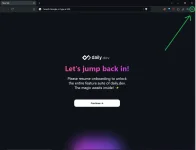
1. Click hamburger menu at the corner right of your Brave browser
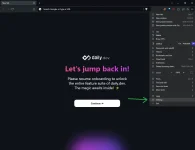
2. Select Settings
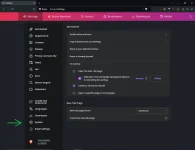
3. Click System
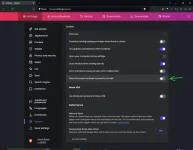
4. Turn off "Show full screen reminder to press Esc on exit"
5. Done. Wala nang pang banas na palaging lumalabas sa screen mo
Wala sya sa chrome kaya sorry chrome users,
thanks to Pathduck in this post
Original post >> You do not have permission to view the full content of this post. Log in or register now.
1. Click hamburger menu at the corner right of your Brave browser
2. Select Settings
3. Click System
4. Turn off "Show full screen reminder to press Esc on exit"
5. Done. Wala nang pang banas na palaging lumalabas sa screen mo
Wala sya sa chrome kaya sorry chrome users,
thanks to Pathduck in this post
Original post >> You do not have permission to view the full content of this post. Log in or register now.