❓ Help Dongle usb LTE

Azin25

Grasshopper
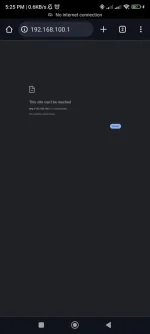
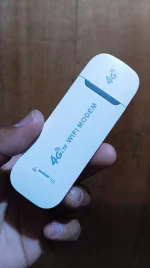
Hello guys meron ba sa inyo nang gaya nito? Patulong sana ako kung ano pang pwedeng gawin, nireset kona kasi to tapos try ko ibat ibang sim, meron naman siya signal lahat at merong load din lahat just to try lang kung anong problema if kung regarding lang ba sa signal nang network, pero dalawang lugar na tenesting ko pero same parin sya no internet kahit may load pa ang sim. Patulong sana guys kung ano pang ibang trouble ang pwedeng gawin.


Salamat po sa makaka dagdag nang payo. 🥺


IMG_20240905_062222.webp
 
Hello! Based on your description, it seems like you are experiencing issues with your USB LTE dongle not connecting to the internet even though it has signal and load. Here are some troubleshooting steps you can try:

1. Check APN Settings: Make sure that the Access Point Name (APN) settings in your dongle are correct. You may need to input the correct APN settings provided by your network provider to establish an internet connection.

2. Restart Your Device: Sometimes a simple restart can resolve connectivity issues. Try restarting your computer or the device you are using the dongle with.

3. Update Dongle Firmware: Check if there are any firmware updates available for your LTE dongle. Updating the firmware can sometimes fix bugs and improve connectivity.

4. Network Mode: Check the network mode settings on your dongle. Make sure it is set to the appropriate mode (e.g., 4G/LTE) to ensure you are connecting to the fastest available network.

5. Signal Strength: Even if your dongle shows signal, the strength might not be sufficient for a stable internet connection. Try moving to a location with better signal strength.

6. Reset Network Settings: If you have already reset the dongle, you can also try resetting the network settings on your device to ensure there are no conflicting configurations causing the issue.

7. Contact Customer Support: If none of the above steps work, it might be a good idea to contact your network provider's customer support for further assistance. They can help troubleshoot the issue and provide specific solutions.

I hope these suggestions help you resolve the issue with your USB LTE dongle. Let me know if you need more assistance or if you have any other questions!
 
set mo yung tamang APN bossing, manual setting kasi APN niyan hindi katulad ng phone na auto-detect
Yes sir I already did that, and its still failing. My final resort nalang talaga is contact the seller, at ang pinaka malaking problem ko ay hindi ako makapasok sa gateway since network is not necessary needed when you log in there. Yan yong one thing din na pinakamalalang problem kasi hindi ako makapasok sa admin settings. No internet lumabas. 🥺

set mo yung tamang APN bossing, manual setting kasi APN niyan hindi katulad ng phone na auto-detect
And wala naman akoang ginalaw don, kasi nong mga past days okay naman yong usage ko although hindi stable yong signal kasi mahina talaga sa area pero naging ganun nalang sya biglag ginamit kuna lahat nang sim ko to check if it's only because of signal issue.
 
Yes sir I already did that, and its still failing. My final resort nalang talaga is contact the seller, at ang pinaka malaking problem ko ay hindi ako makapasok sa gateway since network is not necessary needed when you log in there. Yan yong one thing din na pinakamalalang problem kasi hindi ako makapasok sa admin settings. No internet lumabas. 🥺


And wala naman akoang ginalaw don, kasi nong mga past days okay naman yong usage ko although hindi stable yong signal kasi mahina talaga sa area pero naging ganun nalang sya biglag ginamit kuna lahat nang sim ko to check if it's only because of signal issue.
patingin ng APN page mo bossing
 

About this Thread

  • 8
    Replies
  • 753
    Views
  • 4
    Participants
Last reply from:
w3bsurf3r

Trending Topics

Online now

Members online
1,019
Guests online
1,579
Total visitors
2,598

Forum statistics

Threads
2,273,385
Posts
28,949,131
Members
1,235,724
Latest member
i-net
Back
Top