 PH
PH-
Welcome to PHCorner Forums! Sign up for free to unlock full access and exclusive privileges, including:
- Asking questions about computer and mobile issues
- Discovering internet tips for your mobile network and computer
You are using an out of date browser. It may not display this or other websites correctly.
You should upgrade or use an alternative browser.
You should upgrade or use an alternative browser.
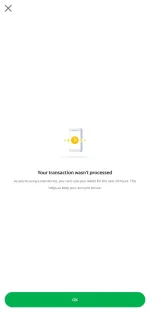
❓ Help Grab 24 hours new Device
🤖
🤖
Hello! I understand your concern about the issue you're facing with Grab. The message you received indicates that you are unable to use your wallet for the next 24 hours due to using a new device. This security measure is in place to protect your account from unauthorized access.
To bypass this issue, you can try the following steps:
1. Contact Grab Support: Reach out to Grab's customer support team and explain your situation. They may be able to assist you in verifying your identity or providing alternative solutions to access your wallet.
2. Wait for 24 Hours: The simplest solution is to wait for the 24-hour period to pass. Once the time has elapsed, you should be able to use your wallet on the new device without any restrictions.
3. Verify Your Account: If you haven't already done so, consider verifying your account with Grab. This may help in establishing your identity and could potentially expedite the process of unlocking your wallet on the new device.
Remember to always prioritize the security of your account and personal information. If you continue to experience issues, it's best to seek assistance from Grab's official support channels for the most accurate guidance tailored to your specific situation.
To bypass this issue, you can try the following steps:
1. Contact Grab Support: Reach out to Grab's customer support team and explain your situation. They may be able to assist you in verifying your identity or providing alternative solutions to access your wallet.
2. Wait for 24 Hours: The simplest solution is to wait for the 24-hour period to pass. Once the time has elapsed, you should be able to use your wallet on the new device without any restrictions.
3. Verify Your Account: If you haven't already done so, consider verifying your account with Grab. This may help in establishing your identity and could potentially expedite the process of unlocking your wallet on the new device.
Remember to always prioritize the security of your account and personal information. If you continue to experience issues, it's best to seek assistance from Grab's official support channels for the most accurate guidance tailored to your specific situation.
About this Thread
-
4Replies
-
3KViews
-
3Participants
Last reply from:
Pmak76
Pmak76
New Topics
-
Kami po ay nasunugan
- Started by mjba4w
- Replies: 2
- 💬 Chitchat
-
Scribd Free Trial 2 download limit bypass Unli Download Bug
- Started by -NEXUS-
- Replies: 5
- 💬 Chitchat
-
RCBC acct ko, pinang scam dito galing.
- Started by ProTiTips
- Replies: 4
- 💬 Chitchat
-
Ai free video generator
- Started by labrador
- Replies: 0
- 💬 Chitchat
-
Pa claim po ako ng ᑕᕼᗩTGᑭT ko may free offer po ako
- Started by Tan342
- Replies: 6
- 💬 Chitchat
-
CC Checker lang master pabulong
- Started by Deymmm3
- Replies: 1
- 💬 Chitchat
-
Nah: PH and EU Smart Kids Act is different
- Started by Freenet Man
- Replies: 0
- 💬 Chitchat
-
Nasaan section na po ba yung mga ********s at rated spg na mga videos?
- Started by Itchigo kurusaki
- Replies: 4
- 💬 Chitchat
Trending Topics
Online now
- Members online
- 434
- Guests online
- 3,475
- Total visitors
- 3,909