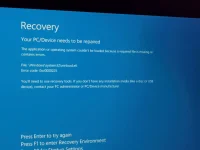
naguba akong laptop kay naay missing file daw sa sys32
It seems like you are experiencing an issue where a critical file is missing from the System32 folder on your laptop. This can cause various problems with the operating system. Here are some steps you can take to address this issue:
1.
Run System File Checker (SFC) scan:
- Open Command Prompt as an administrator.
- Type the command
sfc /scannow and press Enter.
- This will scan your system files and replace any missing or corrupted files.
2.
Check for Windows Updates:
- Make sure your Windows 11 Pro system is up to date by checking for and installing any pending updates. Sometimes, missing files can be restored through system updates.
3.
Perform a System Restore:
- If the missing file issue started recently, you can try performing a system restore to revert your system back to a point where it was working fine.
- Type "system restore" in the Windows search bar and follow the on-screen instructions.
4.
Reinstall the Missing File:
- If you know which specific file is missing, you can try to obtain a copy of that file from a working Windows 11 Pro system and place it in the correct System32 folder.
5.
Repair Windows Installation:
- If the issue persists, you may need to repair your Windows installation. You can do this using the Windows installation media.
If none of the above steps resolve the issue, it may be helpful to seek assistance from a professional technician or contact Microsoft support for further guidance.
 PH
PH