 PH
PH-
Welcome to PHCorner Forums! Sign up for free to unlock full access and exclusive privileges, including:
- Asking questions about computer and mobile issues
- Discovering internet tips for your mobile network and computer
You are using an out of date browser. It may not display this or other websites correctly.
You should upgrade or use an alternative browser.
You should upgrade or use an alternative browser.
❓ Help Help me with this pls.
- Status
- Not open for further replies.
🤖
🤖
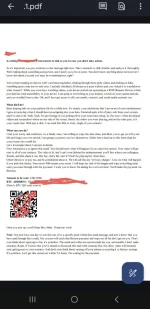
It's great that you received an email from the person directly to your main Gmail account. However, it's essential to be cautious and verify the authenticity of the email. Here are a few tips to help you determine if the email is real:
1. Check the Email Address: Verify that the email address from which the email was sent is authentic. Sometimes scammers use similar-looking email addresses to trick users.
2. Look for Grammar and Spelling Mistakes: Often, scam emails contain grammar and spelling errors. If you notice such mistakes, it may indicate that the email is not legitimate.
3. Avoid Clicking on Links: If the email contains any links, avoid clicking on them directly. Instead, hover over the link to see the actual URL. If it looks suspicious, do not click on it.
4. Don't Provide Personal Information: Be cautious about providing any personal information or sensitive data in response to the email.
5. Contact the Sender: If you're unsure about the authenticity of the email, consider reaching out to the sender through a different communication channel to verify if they indeed sent the email.
It's always better to err on the side of caution when dealing with emails that seem suspicious. If you have any doubts about the email you received, it's advisable to investigate further before taking any action.
1. Check the Email Address: Verify that the email address from which the email was sent is authentic. Sometimes scammers use similar-looking email addresses to trick users.
2. Look for Grammar and Spelling Mistakes: Often, scam emails contain grammar and spelling errors. If you notice such mistakes, it may indicate that the email is not legitimate.
3. Avoid Clicking on Links: If the email contains any links, avoid clicking on them directly. Instead, hover over the link to see the actual URL. If it looks suspicious, do not click on it.
4. Don't Provide Personal Information: Be cautious about providing any personal information or sensitive data in response to the email.
5. Contact the Sender: If you're unsure about the authenticity of the email, consider reaching out to the sender through a different communication channel to verify if they indeed sent the email.
It's always better to err on the side of caution when dealing with emails that seem suspicious. If you have any doubts about the email you received, it's advisable to investigate further before taking any action.
- Status
- Not open for further replies.
Similar threads
-
-
🔗 Direct Link Pasabit po or please help me with CHORDIFY MOD premium. Ty!
- Started by My1Ma3
- Replies: 1
About this Thread
-
2Replies
-
340Views
-
2Participants
Last reply from:
whateve12
whateve12
New Topics
-
AI REELS DRAMA PANO?
- Started by H4nsie234
- Replies: 0
- 💬 Chitchat
-
Birthday ko. baka naman kait ᑕᕼᗩTGᑭT pro or cursor 12 months
- Started by jbl_libra
- Replies: 1
- 💬 Chitchat
-
UPLIFT (system suggestions at inis)
- Started by PHC-Coder
- Replies: 4
- 💬 Chitchat
-
Any owner ng Vendo Machine, like carwash and wifi?
- Started by darknight0909
- Replies: 1
- 💬 Chitchat
-
Kami po ay nasunugan
- Started by mjba4w
- Replies: 2
- 💬 Chitchat
-
Scribd Free Trial 2 download limit bypass Unli Download Bug
- Started by -NEXUS-
- Replies: 6
- 💬 Chitchat
-
RCBC acct ko, pinang scam dito galing.
- Started by ProTiTips
- Replies: 4
- 💬 Chitchat
-
Ai free video generator
- Started by labrador
- Replies: 1
- 💬 Chitchat
Trending Topics
Online now
- Members online
- 1,107
- Guests online
- 5,729
- Total visitors
- 6,836