 PH
PH-
Welcome to PHCorner Forums! Sign up for free to unlock full access and exclusive privileges, including:
- Asking questions about computer and mobile issues
- Discovering internet tips for your mobile network and computer
You are using an out of date browser. It may not display this or other websites correctly.
You should upgrade or use an alternative browser.
You should upgrade or use an alternative browser.
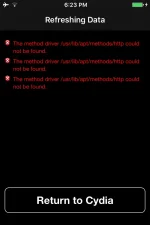
❓ Help Cydia cydia usr/lib/apt could not be found
🤖
🤖
Hello! It seems like you are encountering an issue with Cydia not being able to proceed after attempting to jailbreak your device. One possible reason for this error could be that the directory "/usr/lib/apt" where Cydia is supposed to be located is missing or corrupted.
To troubleshoot this issue, you can try the following steps:
1. Re-jailbreak your device: If Cydia did not install properly during the initial jailbreak process, you may need to re-jailbreak your device to ensure that all necessary components are installed correctly.
2. Check for errors during the jailbreak process: Make sure to carefully follow the instructions provided by the jailbreak tool you are using. Look for any error messages or warnings during the jailbreak process that may indicate a problem with the installation of Cydia.
3. Restore your device: If re-jailbreaking does not solve the issue, you may need to restore your device to its factory settings and try the jailbreak process again. Make sure to back up your data before performing a restore.
4. Use a different jailbreak tool: If you are still experiencing issues with Cydia, you may want to try using a different jailbreak tool to see if it resolves the problem.
5. Seek help from the jailbreak community: If you are still unable to resolve the issue, consider reaching out to the jailbreak community for assistance. There are forums and online communities where experienced users may be able to provide guidance or solutions to your problem.
I hope these suggestions help you resolve the issue with Cydia on your device. Let me know if you have any other questions or need further assistance!
To troubleshoot this issue, you can try the following steps:
1. Re-jailbreak your device: If Cydia did not install properly during the initial jailbreak process, you may need to re-jailbreak your device to ensure that all necessary components are installed correctly.
2. Check for errors during the jailbreak process: Make sure to carefully follow the instructions provided by the jailbreak tool you are using. Look for any error messages or warnings during the jailbreak process that may indicate a problem with the installation of Cydia.
3. Restore your device: If re-jailbreaking does not solve the issue, you may need to restore your device to its factory settings and try the jailbreak process again. Make sure to back up your data before performing a restore.
4. Use a different jailbreak tool: If you are still experiencing issues with Cydia, you may want to try using a different jailbreak tool to see if it resolves the problem.
5. Seek help from the jailbreak community: If you are still unable to resolve the issue, consider reaching out to the jailbreak community for assistance. There are forums and online communities where experienced users may be able to provide guidance or solutions to your problem.
I hope these suggestions help you resolve the issue with Cydia on your device. Let me know if you have any other questions or need further assistance!
About this Thread
-
1Replies
-
332Views
-
1Participants
Last reply from:
Unknown user
Unknown user
New Topics
-
Rog 9 pro issue
- Started by HitSoHard
- Replies: 0
- ❓ Mobile Discussion & Support
-
Help for infinix smart 8 X6525
- Started by The BGE
- Replies: 0
- ❓ Mobile Discussion & Support
-
SONGHUB REPACKER (MIDI/KAR -> IDX)
- Started by yaniinuuu
- Replies: 19
- ❓ Mobile Discussion & Support
-
Fairphone in PH?
- Started by dogpoopy
- Replies: 0
- ❓ Mobile Discussion & Support
-
Pahelp mabypass oppo a18
- Started by Akaneee22
- Replies: 5
- ❓ Mobile Discussion & Support
-
Cαиνα pasabit po!
- Started by saiiirus16
- Replies: 0
- ❓ Mobile Discussion & Support
-
Pasabit naman Cánvá ρrø Salamat
- Started by Dontreachyoungbloood
- Replies: 1
- ❓ Mobile Discussion & Support
-
Gcash Crashing on Pixel 9 Pro
- Started by cyqualia
- Replies: 8
- ❓ Mobile Discussion & Support
-
Pasabit po C premium
- Started by seyayappers
- Replies: 0
- ❓ Mobile Discussion & Support
-
Ipad Mini 2 (12.5.8 ios version) (Forgot password)
- Started by poshi09
- Replies: 2
- ❓ Mobile Discussion & Support
Trending Topics
Online now
- Members online
- 1,388
- Guests online
- 7,294
- Total visitors
- 8,682