PH
PHARDUINO MEGA
Elite

Studocuhäçk is a browser extension for You do not have permission to view the full content of this post. Log in or register now. and You do not have permission to view the full content of this post. Log in or register now. to get free premium features
Features:
-Removal of Premium Banner-Bypassing Blur
-Downloading Documents
Document Download:
1) For documents exceeding 20 pages, gradually scroll to the bottom to ensure all images are fully loaded (Rapid scrolling may cause some images not to load)2) Click the 'Download' button to open a document preview in a separate tab
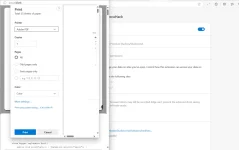
3) In the new tab, use the Ctrl + P shortcut to access the print dialog. Choose 'Save as PDF' to download the document
Browser Installation:
1) Download the file and extract it to a preferred folder2) Navigate to the extensions page in Google Chrome by typing (chrome://extensions/) in the address bar
3) Activate the "Developer Mode" toggle, located at the top-right corner of the extensions page
4) Click on "Load Unpacked" - a new option that becomes visible in the top-left corner after enabling Developer Mode
5) Navigate to and select the directory where you saved the extension
6) Happy Studying

 haha
haha