 PH
PHDescription
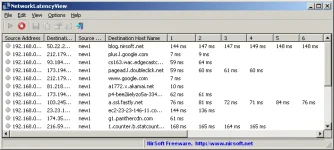
NetworkLatencyView is a simple tool for Windows that listens to the TCP connections on your system and calculates the network latency (in milliseconds) for every new TCP connection detected on your system. For every IP address, NetworkLatencyView displays up to 10 network latency values, and their average. The latency value calculated by NetworkLatencyView is very similar to the result you get from pinging to the same IP address.NetworkLatencyView also allows you to easily export the latency information to text/csv/tab-delimited/html/xml file, or copy the information to the clipboard and then paste it to Excel or other application.
System Requirements
- This utility works on any version of Windows, starting from Windows 2000, and up to Windows 11. Both 32-bit and 64-bit systems are supported.
- In order to capture the TCP packets properly, you have to install one of the following capture drivers:
- You do not have permission to view the full content of this post. Log in or register now.
- You do not have permission to view the full content of this post. Log in or register now. - version 3.4 or later.
- You can also try to use the 'Raw Socket' method without installing any capture driver. However, this method doesn't work in some systems, as well as the latency values detected by using this method are not very accurate.
- When using Network Monitor driver on 64-bit system, you must use the 64-bit version of NetworkLatencyView.
You do not have permission to view the full content of this post. Log in or register now. 32BIT
You do not have permission to view the full content of this post. Log in or register now.