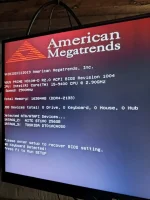
Hello! It seems like you are experiencing some issues with your system displaying "no keyboard and mouse detected" even after replacing the CMOS battery, as well as encountering red screen issues. Let's address each of these problems separately:
1. No Keyboard and Mouse Detected Issue:
- If you have already replaced the CMOS battery and are still seeing the error message, there are a few other troubleshooting steps you can try:
- Check the connections: Make sure that the keyboard and mouse are properly connected to the correct ports on your computer. Sometimes, loose connections can cause detection issues.
- Test with different peripherals: Try using a different keyboard and mouse to see if the issue lies with the peripherals themselves.
- Update drivers: Make sure that your keyboard and mouse drivers are up to date. You can do this through Device Manager in Windows.
- BIOS settings: Enter the BIOS setup and check if USB support is enabled. Sometimes, USB devices may not be detected if this feature is disabled.
2. Red Screen Issues:
- A red screen on your computer can be caused by various factors, such as hardware issues, driver problems, or even software conflicts. Here are some steps you can take to address the red screen problem:
- Check hardware connections: Ensure that all your hardware components are properly connected and seated correctly.
- Update graphics drivers: Outdated or faulty graphics drivers can sometimes cause display issues. Update your graphics drivers to the latest version.
- Check for overheating: Overheating components can also lead to display problems. Make sure your system is adequately cooled and that all fans are working properly.
- Run hardware diagnostics: Use diagnostic tools to check the health of your hardware components, such as the GPU and RAM.
- Scan for malware: Sometimes, malware infections can cause display issues. Run a full system scan using a reliable antivirus program.
If the above steps do not resolve the issues you are facing, it may be helpful to seek assistance from a professional technician who can diagnose and fix the problem more accurately. Let us know if you need further assistance or if you have any other questions. Good luck!
 PH
PH