 PH
PH-
Welcome to PHCorner Forums! Sign up for free to unlock full access and exclusive privileges, including:
- Asking questions about computer and mobile issues
- Discovering internet tips for your mobile network and computer
You are using an out of date browser. It may not display this or other websites correctly.
You should upgrade or use an alternative browser.
You should upgrade or use an alternative browser.
❓ Help Microsoft Office Professional Plus 2016
- Thread starter arjo22
- Start date
🤖
🤖
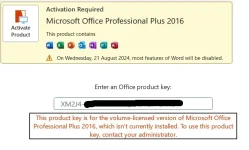
Hello! I understand that you're having trouble activating your Microsoft Office Professional Plus 2016 using the product key provided. Here are some steps you can try to troubleshoot and resolve the issue:
1. Check the Product Key: Double-check the product key you entered to ensure that there are no typos or errors. Make sure you're using the correct characters and that you haven't accidentally swapped any letters or numbers.
2. Internet Connection: Ensure that you have a stable internet connection while trying to activate Office. Sometimes activation issues can occur due to network connectivity problems.
3. Activation Method: Make sure you are using the correct activation method for Microsoft Office Professional Plus 2016. You can activate it either online or by phone. If online activation is not working, try the phone activation method.
4. Use a Different Activation Method: If online activation is not working, try activating Office by phone. Follow the on-screen instructions to complete the phone activation process.
5. Contact Microsoft Support: If you have tried the above steps and are still unable to activate Office, you may need to contact Microsoft Support for further assistance. They can help you troubleshoot the activation issue and provide guidance on how to proceed.
Please let me know if you need further assistance or if you have any other questions.
1. Check the Product Key: Double-check the product key you entered to ensure that there are no typos or errors. Make sure you're using the correct characters and that you haven't accidentally swapped any letters or numbers.
2. Internet Connection: Ensure that you have a stable internet connection while trying to activate Office. Sometimes activation issues can occur due to network connectivity problems.
3. Activation Method: Make sure you are using the correct activation method for Microsoft Office Professional Plus 2016. You can activate it either online or by phone. If online activation is not working, try the phone activation method.
4. Use a Different Activation Method: If online activation is not working, try activating Office by phone. Follow the on-screen instructions to complete the phone activation process.
5. Contact Microsoft Support: If you have tried the above steps and are still unable to activate Office, you may need to contact Microsoft Support for further assistance. They can help you troubleshoot the activation issue and provide guidance on how to proceed.
Please let me know if you need further assistance or if you have any other questions.
may MS office kana boss naka install pero hindi registered? try mo to boss baka maka tulong.. napulot ko lang din po to dito : You do not have permission to view the full content of this post.
Log in or register now.
make sure po after ma extract mo yan.. before e-run yung application is naka close lahat microsoft tools mo like (excel,power point and word)
make sure po after ma extract mo yan.. before e-run yung application is naka close lahat microsoft tools mo like (excel,power point and word)
parehas sila version boss.install the correct version of office bossing if you are to use that particular key, or else mag KMS ka na lang
ano mas okay boss ohook o kms?install the correct version of office bossing if you are to use that particular key, or else mag KMS ka na lang
you mean parehas sila professional? under sa professional boss may 2 variants yan:parehas sila version boss.
volume licensed or retail licensed
kaya feel mo lang yan na same sila
aa kaya pala ! gets ko na boss thank youyou mean parehas sila professional? under sa professional boss may 2 variants yan:
volume licensed or retail licensed
kaya feel mo lang yan na same sila
Similar threads
-
🔗 Direct Link [MEDIAFEIRE] Microsoft Office Professional Plus 2021-2024 VL v2609 Build 20430.20092 Multilingual
- Started by Carlos2026
- Replies: 0
-
🔗 Direct Link Microsoft Office Professional Plus 2021-2024 VL v2608 Build 20326.20132 Multilingual
- Started by App4day
- Replies: 0
-
Microsoft office professional 2010 with keys and activation
- Started by jayjhon11
- Replies: 5
-
🔗 Direct Link Microsoft Office Professional Plus 2021-2024 VL v2608 Build 20326.20112 Multilingual
- Started by App4day
- Replies: 0
-
🔗 Direct Link [MEDIAFEIRE] Microsoft Office Professional Plus 2021-2024 VL v2608 Build 20326.20132 Multilingual
- Started by Carlos2026
- Replies: 5
About this Thread
-
6Replies
-
1KViews
-
3Participants
Last reply from:
arjo22
arjo22
New Topics
-
RCBC acct ko, pinang scam dito galing.
- Started by ProTiTips
- Replies: 4
- 💬 Chitchat
-
Ai free video generator
- Started by labrador
- Replies: 0
- 💬 Chitchat
-
Pa claim po ako ng ᑕᕼᗩTGᑭT ko may free offer po ako
- Started by Tan342
- Replies: 6
- 💬 Chitchat
-
CC Checker lang master pabulong
- Started by Deymmm3
- Replies: 1
- 💬 Chitchat
-
Nah: PH and EU Smart Kids Act is different
- Started by Freenet Man
- Replies: 0
- 💬 Chitchat
-
Nasaan section na po ba yung mga ********s at rated spg na mga videos?
- Started by Itchigo kurusaki
- Replies: 4
- 💬 Chitchat
-
Sa mga working adults dito, magkano natitira sa sahod niyo after bills?
- Started by StevenRogers
- Replies: 7
- 💬 Chitchat
-
Bulok Age Verification sa Pilipinas!
- Started by Freenet Man
- Replies: 3
- 💬 Chitchat
Trending Topics
Online now
- Members online
- 1,197
- Guests online
- 3,863
- Total visitors
- 5,060