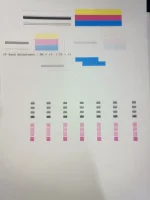
Good day! When you are experiencing issues with black ink printing, there could be a few reasons for this problem. Here are some steps you can take to troubleshoot and potentially fix the issue:
1. Check the Black Ink Cartridge: Start by checking the black ink cartridge. Make sure it is properly installed and has enough ink. If the ink level is low, consider replacing the cartridge with a new one.
2. Clean the Print Head: Sometimes, the print head can become clogged with dried ink, which can affect the print quality. Most printers have a utility for cleaning the print head. You can try running this utility to see if it improves the print quality.
3. Run a Printer Head Alignment: Print head misalignment can also cause printing issues. Check if your printer has a head alignment tool and run it to ensure the print head is aligned correctly.
4. Check Printer Settings: Ensure that the printer settings are correct for the type of paper you are using. Adjusting the print quality settings may also help improve the black ink printing.
5. Update Printer Drivers: Make sure that your printer drivers are up to date. Sometimes, outdated drivers can cause printing issues. Check the manufacturer's website for the latest drivers and install them.
6. Perform a Nozzle Check: Many printers have a utility for checking the nozzles. Running a nozzle check can help identify if there are any issues with the print head.
If after trying these steps the issue persists, it might be worth considering using an Epson adjustment program. This program can help reset certain printer settings and parameters that may be causing the black ink printing problem.
Remember to always follow the manufacturer's instructions and guidelines when troubleshooting printing issues. If the problem continues, it may be best to consult with a professional technician or contact the printer manufacturer for further assistance.
 PH
PH