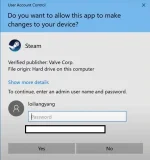
If you are facing admin restrictions while trying to install an application on Windows 11, there are a few approaches you can try to work around this issue:
1. Request Admin Access: The most straightforward way to install an application that requires administrative privileges is to contact your system administrator and request temporary admin access to perform the installation.
2. Run as Administrator: Right-click on the installer file and select "Run as administrator." This might prompt you to enter the administrator password, but it allows you to execute the installation with elevated privileges.
3. Enable Built-in Administrator Account: You can try enabling the built-in Administrator account on your Windows 11 system. To do this, open Command Prompt as an administrator and type net user administrator /active:yes. Then, log out of your current account and log in to the newly enabled Administrator account to install the application.
4. Use Compatibility Mode: Right-click on the installer, go to Properties, and under the Compatibility tab, check the box that says "Run this program as an administrator." This might help bypass some restrictions.
5. Group Policy Editor: If you have access to the Group Policy Editor, you can modify the settings to allow non-admin users to install specific applications. However, this may not be feasible if you are not an administrator yourself.
6. Install Portable Applications: Consider using portable versions of applications that do not require installation or administrative rights. You can run them directly from a USB drive or a specific folder on your computer.
It's essential to note that bypassing admin restrictions without proper authorization may violate your organization's policies and could lead to disciplinary actions. Always try to follow the correct procedures and seek permission from your IT department before attempting any workarounds.
 PH
PH