 PH
PH-
Welcome to PHCorner Forums! Sign up for free to unlock full access and exclusive privileges, including:
- Asking questions about computer and mobile issues
- Discovering internet tips for your mobile network and computer
You are using an out of date browser. It may not display this or other websites correctly.
You should upgrade or use an alternative browser.
You should upgrade or use an alternative browser.
❓ Help PlLDT NO INTERNET
- Thread starter Shinji-84
- Start date
-
- Tags
- internet no internet
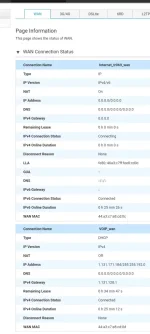
🤖
🤖
Hello! I'm sorry to hear that you're experiencing issues with your internet connection. Here are some steps you can take to troubleshoot the problem:
1. Check the physical connections: Make sure that all cables are securely plugged in. Check the power source, modem, and router connections. Sometimes a loose cable can cause connectivity issues.
2. Restart your modem and router: Unplug the power cables from your modem and router, wait for about 30 seconds, and then plug them back in. This can help reset the devices and establish a new connection.
3. Check for any service outages: Visit your internet service provider's website or contact their customer service to check if there are any reported outages in your area.
4. Reset your router to factory settings: Sometimes resetting your router to its default settings can help resolve connectivity issues. There is usually a reset button on the router that you can press using a paperclip.
5. Check for firmware updates: Make sure that your router's firmware is up to date. You can usually do this by accessing your router's settings through a web browser.
6. Contact your internet service provider: If none of the above steps work, it's best to reach out to your internet service provider for further assistance. They may be able to troubleshoot the issue remotely or send a technician to your location.
I hope these steps help you resolve your internet connectivity issues. Let me know if you need further assistance!
1. Check the physical connections: Make sure that all cables are securely plugged in. Check the power source, modem, and router connections. Sometimes a loose cable can cause connectivity issues.
2. Restart your modem and router: Unplug the power cables from your modem and router, wait for about 30 seconds, and then plug them back in. This can help reset the devices and establish a new connection.
3. Check for any service outages: Visit your internet service provider's website or contact their customer service to check if there are any reported outages in your area.
4. Reset your router to factory settings: Sometimes resetting your router to its default settings can help resolve connectivity issues. There is usually a reset button on the router that you can press using a paperclip.
5. Check for firmware updates: Make sure that your router's firmware is up to date. You can usually do this by accessing your router's settings through a web browser.
6. Contact your internet service provider: If none of the above steps work, it's best to reach out to your internet service provider for further assistance. They may be able to troubleshoot the issue remotely or send a technician to your location.
I hope these steps help you resolve your internet connectivity issues. Let me know if you need further assistance!
ceejaybassist
Forum Veteran
May IP yung VOIP mo so hindi wiring problem yan.
Probably may maintenance or outage sa area niyo na internet lang ang affected at hindi affected ang voice services nila.
Probably may maintenance or outage sa area niyo na internet lang ang affected at hindi affected ang voice services nila.
Maaaaaatty
Fanatic
Ganito din sakin boss. Baka pwede pa help po. Gumagana naman po web browsing, facebook yt. Problem po pag ibang apps na gamit like Tiktok, Twitter, ML, HOK wala na pong Internet.May IP yung VOIP mo so hindi wiring problem yan.
Probably may maintenance or outage sa area niyo na internet lang ang affected at hindi affected ang voice services nila.
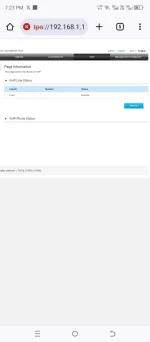
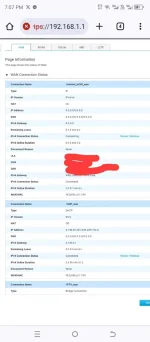
some apps use udp, make sure that all ports are available and all protocols are allowed especially udp, check firewall and router for those parameters, yung browsing kasi is just tcp connection over port 443Ganito din sakin boss. Baka pwede pa help po. Gumagana naman po web browsing, facebook yt. Problem po pag ibang apps na gamit like Tiktok, Twitter, ML, HOK wala na pong Internet.
View attachment 3028408
View attachment 3028416
Maaaaaatty
Fanatic
Newbie po ako paps. Di ko pa po nagagalaw super admin (di ko po alam i access) nangyari po to after hard reset. Tapos now gumamit po ako dns app sa playstore. Gumagana na po tiktok pero pag tinanggal ko. Di nanaman po ulit.some apps use udp, make sure that all ports are available and all protocols are allowed especially udp, check firewall and router for those parameters, yung browsing kasi is just tcp connection over port 443
naka ilang reset na ko boss. ganun pa rin wala pa rin internetReset mo modem/router
samin lang wala.sa pinsan ko kapitbahay lang namin meron naman silang internetbaka meron naman talaga problem ang area niyo today bossing
tinawag ko na sa hotline pero 10 days na wala pa rin ng pupuntang technician. sa kapit bahay namin meron naman silang netMay IP yung VOIP mo so hindi wiring problem yan.
Probably may maintenance or outage sa area niyo na internet lang ang affected at hindi affected ang voice services nila.
Similar threads
-
-
❓ Help S2S Blinking green PON, steady LAN (No internet)
- Started by AMDG
- Replies: 14
-
-
❓ Help Yt no ads dns no internet error on wifi
- Started by debbiepennin
- Replies: 5
-
About this Thread
-
8Replies
-
749Views
-
5Participants
Last reply from:
Shinji-84
Shinji-84
New Topics
-
Mabagal na internet today
- Started by WraithKing0831
- Replies: 0
- ❓ Internet Questions
-
S2S loading problem?
- Started by Cr1sPaul
- Replies: 2
- ❓ Internet Questions
-
ᑕᕼᗩTGᑭT Cookies to Visual Studio
- Started by tearsinheaven
- Replies: 0
- ❓ Internet Questions
-
Instagram Analytics na FREE
- Started by YellowParchment81
- Replies: 0
- ❓ Internet Questions
-
Paano gawin tong nsa vid? AI daw yan
- Started by Burnokik
- Replies: 0
- ❓ Internet Questions
-
ROYALE CABLE MESH
- Started by masrum101
- Replies: 0
- ❓ Internet Questions
-
Free E-sim w/ Data
- Started by Hypermood15
- Replies: 0
- ❓ Internet Questions
-
Blue app 10k followers
- Started by renvin1215
- Replies: 0
- ❓ Internet Questions
-
Freemium Vpn Tricks
- Started by jokejoke
- Replies: 0
- ❓ Internet Questions
-
Anong magandang fiber ISP?
- Started by RaizerRTX
- Replies: 8
- ❓ Internet Questions
Trending Topics
Online now
- Members online
- 412
- Guests online
- 10,801
- Total visitors
- 11,213