 PH
PH-
Welcome to PHCorner Forums! Sign up for free to unlock full access and exclusive privileges, including:
- Asking questions about computer and mobile issues
- Discovering internet tips for your mobile network and computer
You are using an out of date browser. It may not display this or other websites correctly.
You should upgrade or use an alternative browser.
You should upgrade or use an alternative browser.
❓ Help Admin Password ZTE ZXHN F670L
- Thread starter zhadow021
- Start date
🤖
🤖
Hello! I can help you with resetting the admin password for your ZTE ZXHN F670L router. Here are the steps you can follow:
1. Locate the reset button on your ZTE router. It is usually a small hole that requires a pin or paperclip to press.
2. Power on your router and press and hold the reset button for about 10-15 seconds until the router's lights start flashing.
3. Release the reset button and wait for the router to reboot.
4. Once the router has rebooted, you can access the router's web interface by typing its default IP address (usually 192.168.1.1 or 192.168.0.1) in your web browser.
5. Log in using the default username and password. The default username and password for ZTE routers are usually "admin" for both the username and password.
6. You can now set a new admin password for your router to secure your network.
Remember to choose a strong password that is not easily guessable to ensure the security of your network. Let me know if you encounter any issues during the process.
1. Locate the reset button on your ZTE router. It is usually a small hole that requires a pin or paperclip to press.
2. Power on your router and press and hold the reset button for about 10-15 seconds until the router's lights start flashing.
3. Release the reset button and wait for the router to reboot.
4. Once the router has rebooted, you can access the router's web interface by typing its default IP address (usually 192.168.1.1 or 192.168.0.1) in your web browser.
5. Log in using the default username and password. The default username and password for ZTE routers are usually "admin" for both the username and password.
6. You can now set a new admin password for your router to secure your network.
Remember to choose a strong password that is not easily guessable to ensure the security of your network. Let me know if you encounter any issues during the process.
Salamat po sir. Nalimutan ko po po ilagay na Converge.kung PLDT yan try this...
Username: adminpldt
Password: HL1EU9804BKjTa6734uP370
Ayaw din boss gumana nito.try this...
Username: admin
Password: Converge@zte123

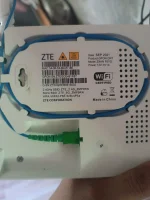
ayaw parin bosstry this...
Username: user
Password: user
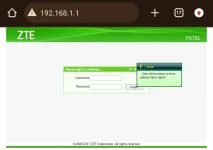
di gumagana yung
admin
Converge@zte123
pano kaya po ito?
lonewolf07
Enthusiast
d nagana bosskung PLDT yan try this...
Username: adminpldt
Password: HL1EU9804BKjTa6734uP370
Ianthoughts
Leecher
na access na po ba ito? na try ko din lahat di naman nagana mag MAC Filtering sana ako.. tibay nung kapitbahay eh sya lang pinakabit tapos pinasabit pa yung iba
dyondyon13
Leecher
URL: You do not have permission to view the full content of this post.
Log in or register now.
Username: adminpldt
Password: HL1EU9804BKjTa6734uP370
Username: adminpldt
Password: HL1EU9804BKjTa6734uP370
Similar threads
-
Admin at password para sa ZTE model ZXHN F679D
- Started by TOpKILL
- Replies: 1
-
❓ Help ZTE ZXHN F670L FROM CONVERGE
- Started by Snezh
- Replies: 0
-
-
About this Thread
-
12Replies
-
13KViews
-
8Participants
Last reply from:
akuma888
akuma888
New Topics
-
Want to Explore Ways to Earn Money Online? $$$
- Started by za6659856
- Replies: 0
- 💬 Chitchat
-
Pinay Database (PDB)
- Started by 2sga
- Replies: 0
- 💬 Chitchat
-
Google flow google ai activation link willing to pay
- Started by moneycoming
- Replies: 0
- 💬 Chitchat
-
Sino po may access sa gemini and google flow na pro or premium
- Started by moneycoming
- Replies: 3
- 💬 Chitchat
-
Need help about poser
- Started by treeth
- Replies: 0
- 💬 Chitchat
-
Songhub remote command
- Started by zwack20
- Replies: 0
- 💬 Chitchat
-
Fresh ip address
- Started by biscoff cheesecake
- Replies: 0
- 💬 Chitchat
-
How to be Established. I've been a member for so long
- Started by PHC - VictorVance
- Replies: 1
- 💬 Chitchat
-
Hulaan niyo Kaninong Last Words ito
- Started by GoatPhomator666
- Replies: 1
- 💬 Chitchat
-
VENDO AI INVESTMENT PLATFORM
- Started by REYNNEEEE
- Replies: 1
- 💬 Chitchat
Trending Topics
Online now
- Members online
- 1,005
- Guests online
- 8,351
- Total visitors
- 9,356