❓ Help MSI Afterburner GPU Temparature Missing

Zenitsu_24

Established
Acer Nitro V ANV15-51-53DG
Specs:
  • Intel Core i5-13420H
  • Geforce RTX 4050
  • 8GB DDR5 5200Mhz
  • NVMe Gen 4 512GB
  • Windows 10 Pro

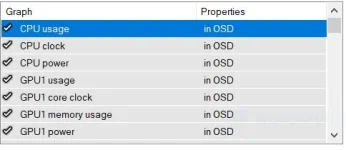
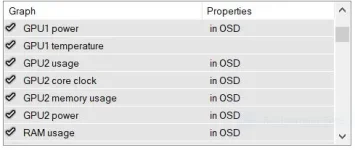
May alam ba kayong fix neto? maganda kasi ma monitor temps while gaming kasi number one yan na nakakasia ng laptop any help will be appreciated, thank you ka PHC.
1.JPG


2.JPG


3.JPG


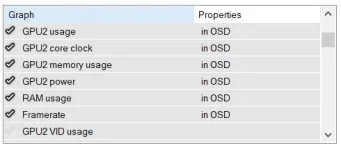
GPU 1 lang yung may temperature monitor.

Ito rin ang avarage temperatures as a whole nya.
  • Idle = 38 °C
  • Gaming = 49 °C
  • Highest Temparature = 59 °C

May fix bato para ma monitor ang temp ng GPU 2?
 
Hello! It seems like you are experiencing an issue with MSI Afterburner not displaying GPU temperatures on your Acer Nitro V ANV15-51-53DG laptop. Here are a few troubleshooting steps you can try to resolve this issue:

1. Update MSI Afterburner: Make sure you have the latest version of MSI Afterburner installed on your laptop. Sometimes, updating the software can fix bugs and compatibility issues.

2. Update Graphics Card Drivers: Ensure that your graphics card drivers are up to date. You can download the latest drivers directly from the manufacturer's website (NVIDIA or AMD).

3. Check GPU Monitoring Settings: Open MSI Afterburner and go to the settings menu. Make sure that the monitoring feature is enabled for GPU temperature. You can customize which parameters are displayed on the monitoring overlay.

4. Check GPU Compatibility: Some laptops may have proprietary GPU monitoring software that conflicts with third-party tools like MSI Afterburner. Make sure that your laptop's GPU is compatible with MSI Afterburner.

5. Temperature Monitoring Alternatives: If MSI Afterburner continues to have issues, you can try alternative software like HWMonitor or GPU-Z to monitor your GPU temperature while gaming.

6. Check System Stability: Ensure that your laptop is not overheating during gaming sessions. Clean out any dust from the cooling system and consider using a laptop cooling pad to improve airflow.

7. Contact Support: If none of the above solutions work, you can reach out to MSI Afterburner support for further assistance. They may be able to provide specific guidance for your laptop model.

I hope these suggestions help you resolve the issue with MSI Afterburner not displaying GPU temperatures on your Acer Nitro V laptop. Monitoring your GPU temperature is indeed crucial for maintaining optimal performance and preventing overheating. Let me know if you need further assistance or have any other questions!
 

About this Thread

  • 1
    Replies
  • 393
    Views
  • 1
    Participants
Last reply from:
Unknown user

Trending Topics

Online now

Members online
1,139
Guests online
1,361
Total visitors
2,500

Forum statistics

Threads
2,273,442
Posts
28,949,527
Members
1,235,747
Latest member
_usteng_
Back
Top