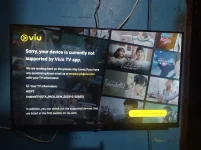
Hello! I'm sorry to hear that you're having trouble with VIU on your Android TV. Here are a few troubleshooting steps you can try to resolve the issue:
1. Check Internet Connection: Make sure that your Android TV is connected to the internet and that the connection is stable. You can try restarting your router or reconnecting to the Wi-Fi network.
2. Update VIU App: Check if there are any updates available for the VIU app on the Google Play Store. Updating the app to the latest version may help resolve any compatibility issues.
3. Clear App Data and Cache: Go to Settings on your Android TV, then navigate to Apps or Application Manager. Find the VIU app, and then clear its data and cache. This can help fix any issues related to the app's stored data.
4. Restart Android TV: Sometimes a simple restart can fix various issues with apps. Try restarting your Android TV by unplugging it from the power source, waiting for a few minutes, and then plugging it back in.
5. Check for System Updates: Make sure that your Android TV's operating system is up to date. Go to Settings, then System, and check for any available system updates.
6. Contact VIU Support: If the issue persists, you can reach out to VIU's customer support for further assistance. They may be able to provide specific troubleshooting steps for Android TV users.
I hope these steps help you get VIU up and running on your Android TV. Let me know if you need further assistance!
 PH
PH