 PH
PH-
Welcome to PHCorner Forums! Sign up for free to unlock full access and exclusive privileges, including:
- Asking questions about computer and mobile issues
- Discovering internet tips for your mobile network and computer
You are using an out of date browser. It may not display this or other websites correctly.
You should upgrade or use an alternative browser.
You should upgrade or use an alternative browser.
🍪 Cookies 4K PREMIUM NETFLIX COOKIES 2
- Thread starter Kiwiii
- Start date
Pano po to gamitin?
How to Use Netflix Premium Cookies from Usecookies.com
Step 1: Open the Extension
- Open your web browser (e.g., Google Chrome, Mozilla Firefox).
- Go to your browser’s Extension store (e.g., Chrome Web Store, Firefox Add-ons).
- Search for a Cookie Editor extension.
- Click the “Add to Chrome” or “Add to Firefox” button to install the extension.
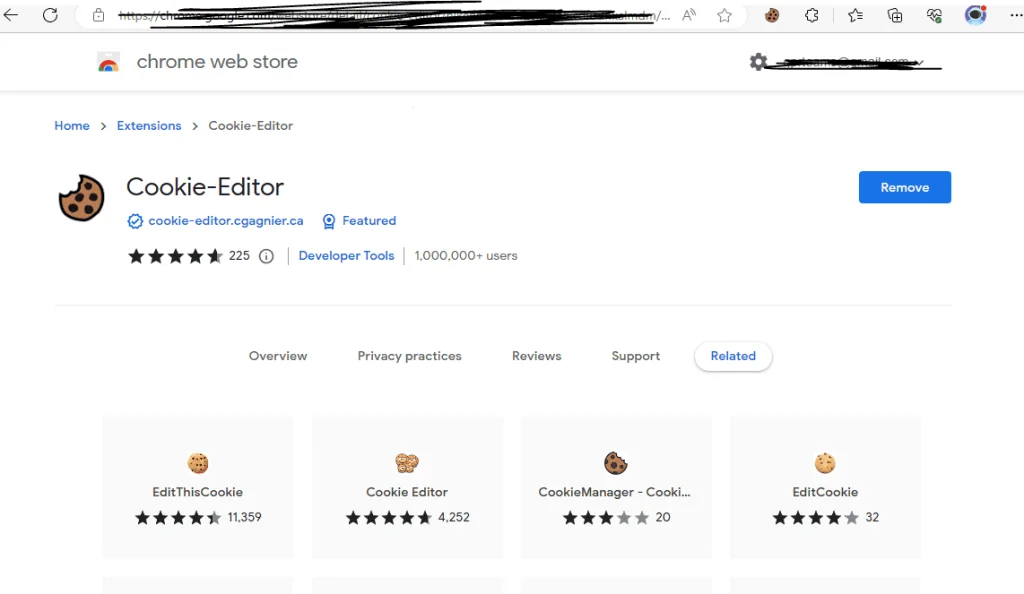
Step 2: Open the Cookie Editor
- Once the extension is Installed, its symbol will appear in your browser’s toolbar (often in the top-right corner).
- Pin it and launch the editor; click the Cookie Editor extension icon.
Step 3: View Premium Cookies
- A list of cookies for the current website will be visible in the Cookie Editor window.
- Each cookie’s name, value, domain, expiration date, and other information can be viewed.
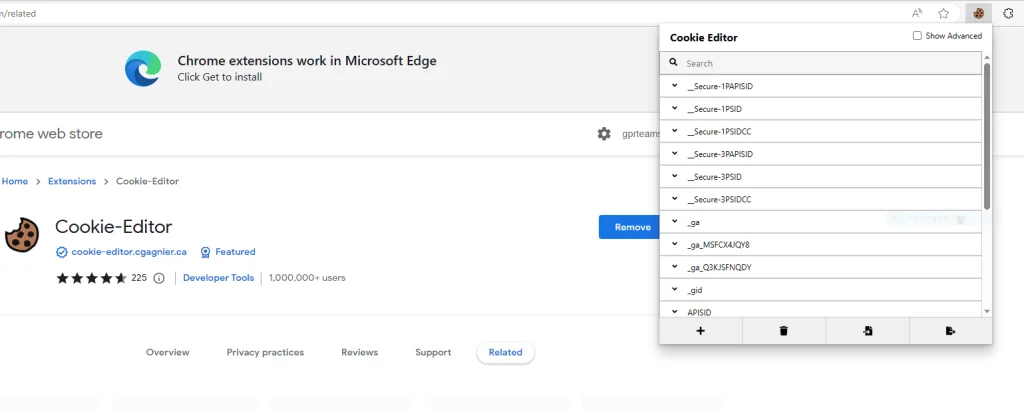
Step 4: Delete Cookies
- A cookie can be deleted by selecting it from the list and then looking for an “All Delete” or trash can icon.
- The specified cookie will be deleted when you click on it.
Step 5: Add New Cookies
- Look for an option like the “Import Cookie” button in the Cookie Editor window to add a new cookie.
- Paste the copied Premium cookies and click on the import button after pasting the cookie.

Step 6: Test the Changes
- To test the modifications you made to the cookies, refresh the page or go to another page on the same website.
- Check to see if the altered cookies are operating as planned.
gamerloner13
Established
thanks!support po!
kinjijul25
Grasshopper
salamats lods
About this Thread
-
5Replies
-
158Views
-
5Participants
Last reply from:
kinjijul25
kinjijul25
New Topics
-
PEACOCK TV + APPLE TV 1MONTH
- Started by Aieou
- Replies: 1
- 🆓 Freemium Access
-
Quillbot Subscription Annual Account
- Started by GOJO GLITCH
- Replies: 1
- 🆓 Freemium Access
-
Get a Premium .tech Domain FREE for One Year
- Started by c h r z z h p
- Replies: 0
- 🆓 Freemium Access
-
Premium X5 Accounts FRESH for ALL | 25-OCT-26
- Started by zaxcal
- Replies: 0
- 🆓 Freemium Access
-
Déézér PREMIUM | 1 MONTH
- Started by Beatriz9
- Replies: 0
- 🆓 Freemium Access
-
Grammarly Pro | 1 WEEK #143
- Started by Beatriz9
- Replies: 0
- 🆓 Freemium Access
-
TIDAL INDIVIDUAL w/ DJ EXTENSION | 1 MONTH #143
- Started by Beatriz9
- Replies: 0
- 🆓 Freemium Access
-
Steam Premium Account 20x 10-25-26
- Started by BossHabibi
- Replies: 2
- 🆓 Freemium Access
-
DUOLINGO SUPER | 1 WEEK #136
- Started by Beatriz9
- Replies: 0
- 🆓 Freemium Access
-
Netflix Premium Cookies 180x 10-25-26
- Started by BossHabibi
- Replies: 2
- 🆓 Freemium Access
Trending Topics
Online now
- Members online
- 346
- Guests online
- 10,511
- Total visitors
- 10,857