How to split screen on poco M3 pro 5g?

Zackmahdeck6

Forum Veteran
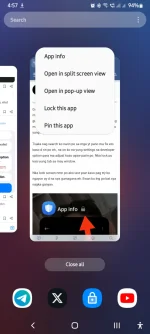
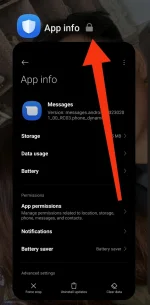
Good afternoon mga paps , ask ko lng po sana pano po mag split screen sa poco M3 pro 5g na cp? D po kasi gumagana pag hinold ko yung app sa window, kusa syang mapupunta dun sa settings ng app eh, d po lumalamabas yung mga button para mkapag split screen .

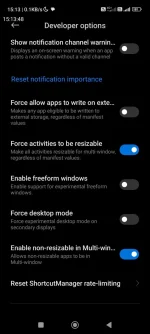
Tsaka nag search ko narin po sa mga yt pano ma fix eto kaso d rin po eh , na on ko na yung settings sa developer option para ma adjust kaso ayaw parin po. Nka lock po kasi yung tab sa may window.

Nka lock screen nmn po ako last year kaso pag try ko ngayon ay d na sya gumagana eh. Ewan ko lng po bat sya nagka ganyan.
IMG_20240728_152824.webp

Screenshot_2024-07-28-15-13-48-175_com.android.settings.jpg
 
Hello! I'm sorry to hear that you're having trouble with splitting the screen on your Poco M3 Pro 5G. Let me help you with that.

To activate split screen on your Poco M3 Pro 5G, you can follow these steps:

1. Open the first app you want to use in split screen mode.
2. Swipe up from the bottom of the screen to access the Recent apps overview.
3. Find the app you want to use in split screen and tap on its app icon at the top.
4. Select "Split screen" from the menu options that appear.

If you're still having issues with split screen mode, you may need to check the following:

1. Make sure the apps you are trying to use in split screen mode support this feature.
2. Ensure that your Poco M3 Pro 5G is running on the latest software update.
3. Try restarting your device to see if that resolves the issue.
4. If you have enabled any screen lock settings, try disabling them temporarily to see if it makes a difference.

If none of these steps work, you can try reaching out to Poco's customer support for further assistance. I hope this helps you resolve the split screen issue on your Poco M3 Pro 5G. Let me know if you need further assistance!
 
Depende ata sa app sir at sa unit. Kasi kung phone mo ay high end from xiaomi o poco nakakagamit naman ng splitscreen neither on or off yung sa devs option.
 
1722329873224.webp

Wala ka ata dapat galawin sa setting nyan lods. Kung hindi ako nagkakamali,may apps talaga na hindi pwede pagsamahin sa split screen for security purposes. Kagaya dyan sa screenshot mo, Yung message app ang nalagay. Nakalimutan ko lang kung saang site ko yun nabasa pero may apps talaga na hindi gumagana sa split screen. Try mo rin icheck kung may system update. Yan kasi minsan nagpapaloko sa android phone. Image is for reference only.
 

Similar threads

About this Thread

  • 3
    Replies
  • 711
    Views
  • 3
    Participants
Last reply from:
iSpark

Trending Topics

Online now

Members online
1,192
Guests online
1,173
Total visitors
2,365

Forum statistics

Threads
2,273,981
Posts
28,952,860
Members
1,235,015
Latest member
eh3aanarz
Back
Top