❓ Help PANO TO!

Status
Not open for further replies.

Hrdwrk

Established
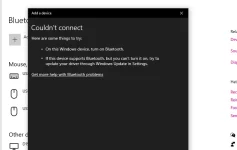
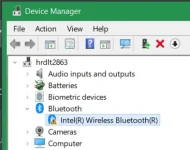
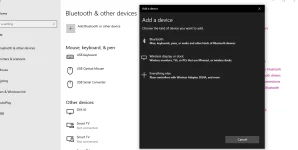
Pano to mga idol . di ko tlaga ma kita on ng bluetooth ng pc ko , tinry kona mga tutorials sa YT about dito not working wala di ma display na bluetooth sa device manager ko , pati sa services automatic kona eh set except sa user bluetooth na manual . :Aaaaa::Aaaaa:
1721808389536.webp


1721808448584.webp
 
Hello! I understand your frustration with not being able to turn on the Bluetooth on your PC despite trying various tutorials from YouTube. Let's troubleshoot this issue together.

Here are a few steps you can take to try and resolve the Bluetooth issue on your PC:

1. Hardware Check: Ensure that your PC actually has Bluetooth capabilities. Some PCs require an external Bluetooth adapter to be able to use Bluetooth.

2. Driver Update: Make sure that your Bluetooth drivers are up to date. You can do this by going to the manufacturer's website and downloading the latest drivers for your specific model.

3. Check BIOS Settings: Sometimes Bluetooth functionality can be disabled in the BIOS settings. Check your BIOS settings to ensure that Bluetooth is enabled.

4. Device Manager: Since you mentioned that Bluetooth is not showing up in Device Manager, try the following:
- Right-click on the Start button and select Device Manager.
- Look for Bluetooth in the list of devices. If you don't see it, try scanning for hardware changes by clicking on the Action menu and selecting "Scan for hardware changes."

5. Services Check: You mentioned that you have set the Bluetooth services to automatic. Make sure that the Bluetooth Support Service and Bluetooth Driver Management Service are both set to automatic and are running.

6. Software Conflict: Sometimes third-party software can interfere with Bluetooth functionality. Try disabling any third-party antivirus software or firewall temporarily to see if that resolves the issue.

7. System Restore: If all else fails, you can try performing a system restore to a point where Bluetooth was working properly.

If none of these steps work, it might be worth contacting your PC manufacturer's support team for further assistance. They may be able to provide additional troubleshooting steps specific to your PC model.

I hope these suggestions help you in resolving the Bluetooth issue on your PC. Let me know if you need further assistance or have any other questions.
 
Status
Not open for further replies.

About this Thread

  • 13
    Replies
  • 513
    Views
  • 5
    Participants
Last reply from:
v2clone

Trending Topics

Online now

Members online
1,112
Guests online
1,009
Total visitors
2,121

Forum statistics

Threads
2,273,781
Posts
28,951,551
Members
1,234,953
Latest member
murphygeorgina17
Back
Top