 PH
PH-
Welcome to PHCorner Forums! Sign up for free to unlock full access and exclusive privileges, including:
- Asking questions about computer and mobile issues
- Discovering internet tips for your mobile network and computer
You are using an out of date browser. It may not display this or other websites correctly.
You should upgrade or use an alternative browser.
You should upgrade or use an alternative browser.
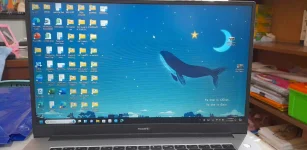
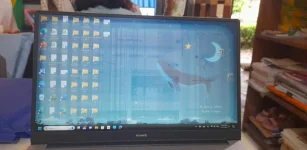
❓ Help Help po Huawei Matebook D15, Sirang LCD na po ba ito?
- Status
- Not open for further replies.
🤖
🤖
Hello! I'm sorry to hear about the issue with your Huawei Matebook D15's LCD display. Based on the image you shared, it appears that the screen is displaying vertical lines and distorted colors, which could indicate a problem with the LCD panel or the graphics driver.
Here are a few troubleshooting steps you can try to diagnose and potentially resolve the issue:
1. Restart Your Laptop: Sometimes, a simple restart can fix minor display issues. Turn off your laptop completely, wait for a few seconds, and then turn it back on.
2. Check External Monitor: Connect your laptop to an external monitor or TV using an HDMI cable. If the external display works fine, then the issue may be with the laptop's LCD screen.
3. Update Graphics Drivers: Outdated or corrupted graphics drivers can cause display problems. Go to the Device Manager, locate the Display Adapters section, right-click on the graphics driver, and select "Update driver."
4. Boot into Safe Mode: Restart your laptop and boot into Safe Mode. If the display appears normal in Safe Mode, it could indicate that a third-party software or driver is causing the issue.
5. Perform a System Restore: If the issue started recently, you can try performing a system restore to revert your laptop to a previous working state.
6. Contact Huawei Support: If none of the above steps resolve the issue, it's best to contact Huawei's customer support for further assistance. They may be able to provide specific solutions or recommend repair options.
If the problem persists and you suspect a hardware issue with the LCD panel, it may require professional repair or replacement. Remember to back up your important data before proceeding with any troubleshooting steps that may involve resetting or reinstalling the operating system.
I hope these suggestions help you troubleshoot and potentially resolve the display issue on your Huawei Matebook D15. Let me know if you need further assistance or have any other questions!
Here are a few troubleshooting steps you can try to diagnose and potentially resolve the issue:
1. Restart Your Laptop: Sometimes, a simple restart can fix minor display issues. Turn off your laptop completely, wait for a few seconds, and then turn it back on.
2. Check External Monitor: Connect your laptop to an external monitor or TV using an HDMI cable. If the external display works fine, then the issue may be with the laptop's LCD screen.
3. Update Graphics Drivers: Outdated or corrupted graphics drivers can cause display problems. Go to the Device Manager, locate the Display Adapters section, right-click on the graphics driver, and select "Update driver."
4. Boot into Safe Mode: Restart your laptop and boot into Safe Mode. If the display appears normal in Safe Mode, it could indicate that a third-party software or driver is causing the issue.
5. Perform a System Restore: If the issue started recently, you can try performing a system restore to revert your laptop to a previous working state.
6. Contact Huawei Support: If none of the above steps resolve the issue, it's best to contact Huawei's customer support for further assistance. They may be able to provide specific solutions or recommend repair options.
If the problem persists and you suspect a hardware issue with the LCD panel, it may require professional repair or replacement. Remember to back up your important data before proceeding with any troubleshooting steps that may involve resetting or reinstalling the operating system.
I hope these suggestions help you troubleshoot and potentially resolve the display issue on your Huawei Matebook D15. Let me know if you need further assistance or have any other questions!
after po magstay? restart po?Go to BIOS. stay there for a while. kung walang issue sa BIOS its a driver problem. kung ganyan pa rin sa BIOS GG na LCD.
yep kung ok naman ang BIOS graphics driver mo lng problema nyan. e update moafter po magstay? restart po?
salamat po ng maramiyep kung ok naman ang BIOS graphics driver mo lng problema nyan. e update mo
update po.. it didnt work sir, i tried it a lot of times. pag nasa BIOS poko same po may "vignettes" and dim yung gilid ng screen pero salamat parin po. sana may makahelp sakinyep kung ok naman ang BIOS graphics driver mo lng problema nyan. e update mo
- Status
- Not open for further replies.
Similar threads
-
❓ Help [Help] Reformat Huawei Matebook
- Started by wind123
- Replies: 12
-
About this Thread
-
5Replies
-
2KViews
-
2Participants
Last reply from:
No_Mind
No_Mind
New Topics
-
Help po !!!! My account got häçked Facebook and steam
- Started by bujoy20
- Replies: 6
- ❓ Computer Discussion & Support
-
Replace laptop lcd
- Started by toki07
- Replies: 0
- ❓ Computer Discussion & Support
-
Mga bossing patulong po nahäçk account ko due to carelessness
- Started by Jeii
- Replies: 2
- ❓ Computer Discussion & Support
-
Computer parts na cheap
- Started by bjenjay1
- Replies: 1
- ❓ Computer Discussion & Support
-
PC APPS - remote or auto saved type and auto audio
- Started by babyzero
- Replies: 0
- ❓ Computer Discussion & Support
-
Data Recovery May Chance pa bato
- Started by tambay28
- Replies: 0
- ❓ Computer Discussion & Support
-
Capcut PC pasabit po
- Started by L A Z A
- Replies: 0
- ❓ Computer Discussion & Support
-
Download Youtube Video using CMD
- Started by BeerGin69
- Replies: 1
- ❓ Computer Discussion & Support
-
Taiwebs alternative websites
- Started by gigsta
- Replies: 0
- ❓ Computer Discussion & Support
-
Tropic Colour - Sino meron nito?
- Started by mikehacker182
- Replies: 0
- ❓ Computer Discussion & Support
Trending Topics
Online now
- Members online
- 732
- Guests online
- 4,118
- Total visitors
- 4,850