 PH
PH-
Welcome to PHCorner Forums! Sign up for free to unlock full access and exclusive privileges, including:
- Asking questions about computer and mobile issues
- Discovering internet tips for your mobile network and computer
You are using an out of date browser. It may not display this or other websites correctly.
You should upgrade or use an alternative browser.
You should upgrade or use an alternative browser.
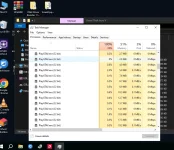
❓ Help GTA V not launching 100% CPU Usage lang stock.
- Status
- Not open for further replies.
🤖
🤖
Hello! It seems like you are experiencing an issue with GTA V not launching on your PC with a Ryzen 5 5600G processor but no dedicated graphics card. Since you mentioned that the game installer works fine on other PCs, let's try to troubleshoot the issue on your system.
Here are some steps you can follow to try and resolve the problem:
1. Check System Requirements: Ensure that your PC meets the minimum system requirements for GTA V. While the Ryzen 5 5600G is a capable processor, not having a dedicated graphics card may be causing the issue.
2. Update Windows: Make sure your Windows operating system is up to date with the latest updates from Microsoft. Sometimes, compatibility issues can arise if your system is not fully updated.
3. Verify Game Files: If you have already installed the game, try verifying the game files through the game launcher (e.g., Steam, Rockstar Games Launcher) to ensure that all game files are intact and not corrupted.
4. Check Background Processes: Sometimes, background processes can consume CPU resources and prevent the game from launching properly. Close any unnecessary programs running in the background before trying to launch the game.
5. Graphics Settings: Since you are using integrated graphics on the Ryzen 5 5600G, try lowering the graphics settings within the game to see if that helps with launching the game.
6. DirectX and Visual C++ Redistributable: Ensure that you have the latest version of DirectX and Visual C++ Redistributable installed on your system as these are essential for running games.
7. BIOS Update: Check if there are any BIOS updates available for your motherboard. Sometimes, BIOS updates can improve system stability and compatibility with certain software.
8. Monitor CPU Usage: If you are experiencing high CPU usage when trying to launch the game, it could indicate a bottleneck. Consider upgrading to a dedicated graphics card to improve gaming performance.
If you have tried these steps and continue to experience issues, please provide more details about any error messages you receive when trying to launch the game. Additionally, you may want to consider adding a dedicated graphics card to your system to improve gaming performance and compatibility with modern games like GTA V.
Here are some steps you can follow to try and resolve the problem:
1. Check System Requirements: Ensure that your PC meets the minimum system requirements for GTA V. While the Ryzen 5 5600G is a capable processor, not having a dedicated graphics card may be causing the issue.
2. Update Windows: Make sure your Windows operating system is up to date with the latest updates from Microsoft. Sometimes, compatibility issues can arise if your system is not fully updated.
3. Verify Game Files: If you have already installed the game, try verifying the game files through the game launcher (e.g., Steam, Rockstar Games Launcher) to ensure that all game files are intact and not corrupted.
4. Check Background Processes: Sometimes, background processes can consume CPU resources and prevent the game from launching properly. Close any unnecessary programs running in the background before trying to launch the game.
5. Graphics Settings: Since you are using integrated graphics on the Ryzen 5 5600G, try lowering the graphics settings within the game to see if that helps with launching the game.
6. DirectX and Visual C++ Redistributable: Ensure that you have the latest version of DirectX and Visual C++ Redistributable installed on your system as these are essential for running games.
7. BIOS Update: Check if there are any BIOS updates available for your motherboard. Sometimes, BIOS updates can improve system stability and compatibility with certain software.
8. Monitor CPU Usage: If you are experiencing high CPU usage when trying to launch the game, it could indicate a bottleneck. Consider upgrading to a dedicated graphics card to improve gaming performance.
If you have tried these steps and continue to experience issues, please provide more details about any error messages you receive when trying to launch the game. Additionally, you may want to consider adding a dedicated graphics card to your system to improve gaming performance and compatibility with modern games like GTA V.
arsenal1205
Rarely opens PHC
ts tanong lang cr-acked ba yung GTA mo or legit original na nabili mo sa steam at sa rockstar games?
- Status
- Not open for further replies.
About this Thread
-
2Replies
-
612Views
-
2Participants
Last reply from:
arsenal1205
arsenal1205
New Topics
-
Suggest VA job websitrs na legit
- Started by mitchmp
- Replies: 0
- ❓ Computer Discussion & Support
-
Calculator Emulator (Canon F789SGA I or II)
- Started by DDankii
- Replies: 0
- ❓ Computer Discussion & Support
-
Laptop Price for 2027
- Started by sisig with egg
- Replies: 0
- ❓ Computer Discussion & Support
-
Is this graphic card issue?
- Started by markjson
- Replies: 2
- ❓ Computer Discussion & Support
-
SoungHub No Sound Encountered
- Started by pow_tah
- Replies: 2
- ❓ Computer Discussion & Support
-
Apk to ipk any idea how to make it?
- Started by a s a r k a n a b a
- Replies: 1
- ❓ Computer Discussion & Support
-
TEMPORARY EMAIL NA HINDI NADEDETECT AS TEMPORARY EMAIL
- Started by 21banana
- Replies: 2
- ❓ Computer Discussion & Support
-
Looking for CSI ETABS Ultimate 2026 v23.2 Acïvâør
- Started by talaotep
- Replies: 0
- ❓ Computer Discussion & Support
-
I need help about my pc
- Started by lex2133
- Replies: 7
- ❓ Computer Discussion & Support
Trending Topics
Online now
- Members online
- 711
- Guests online
- 4,454
- Total visitors
- 5,165